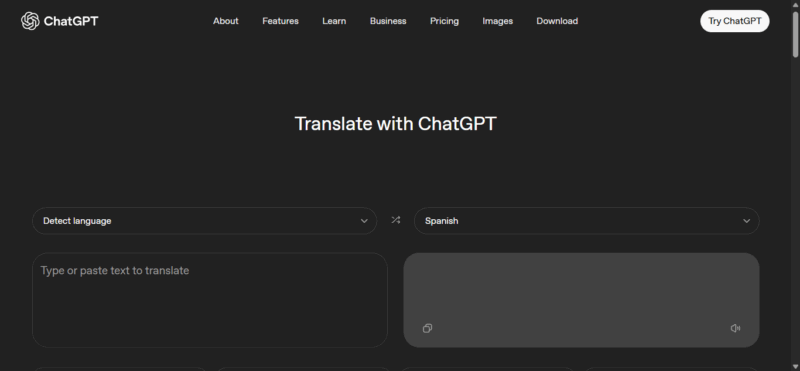
OpenAI has quietly launched ChatGPT Translate. It’s a free, web-based tool that goes beyond basic word swaps. ChatGPT Translate aims for real meaning, tone, and context in translations, though it has some clear drawbacks worth knowing about.
What ChatGPT Translate is About
ChatGPT Translate isn’t your typical word-for-word converter. It reads full sentences and paragraphs, understands the context, and tries to keep the original meaning intact.
This matters more than it sounds. Anyone who has translated an email, message, or work document knows how easily tone can be lost. A sentence meant to sound polite can come across as rude. A casual message can suddenly feel stiff or awkward.
What makes ChatGPT Translate different is how much control it gives you. You can ask it to sound formal, casual, or very simple. You can also follow up and ask for changes if something feels off. This back-and-forth makes the tool feel less like a translator and more like a conversation.

Because it runs inside ChatGPT’s system, it fits naturally into the same workspace many people already use for writing, image tools, and even running apps directly inside ChatGPT or building custom GPTs.
Translation can become part of a larger workflow instead of a separate step. This approach also hints at OpenAI’s bigger plan of turning ChatGPT into an all-in-one tool, not just a chatbot.
How ChatGPT Translate Stacks Up to Google Translate and Alternatives
ChatGPT Translate takes a slightly different approach from Google Translate despite solving the same problem. Google Translate is fast, supports far more languages, and works offline through mobile apps.
It is still the better option for travel, quick phrases, street signs, or anything you need instantly. If you’re on the go, tips for getting the most from Google Translate can make it even handier.
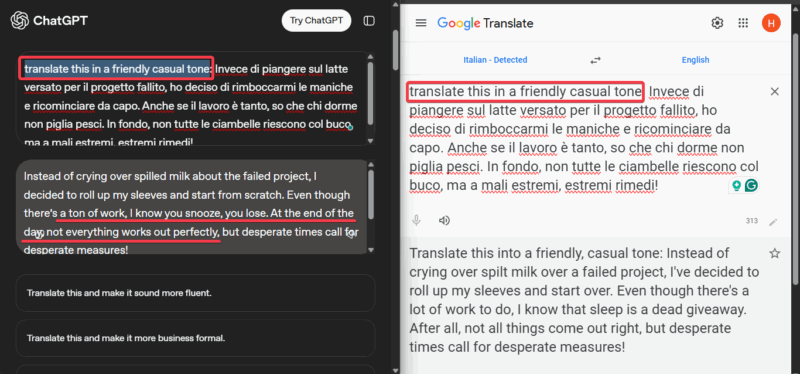
Where ChatGPT shines is in nuance. It handles full context better, especially with slang, idioms, and longer explanations. This makes it more useful for emails, learning, and conversations where tone really matters.
DeepL is another solid alternative among free online translators. It’s known for clean, professional translations and works well for documents in the languages it supports. It feels polished and reliable for document translation.
However, ChatGPT Translate counters with its interaction. You can ask questions, request changes, and refine results immediately. Google Translate and DeepL usually give you one result and move on.
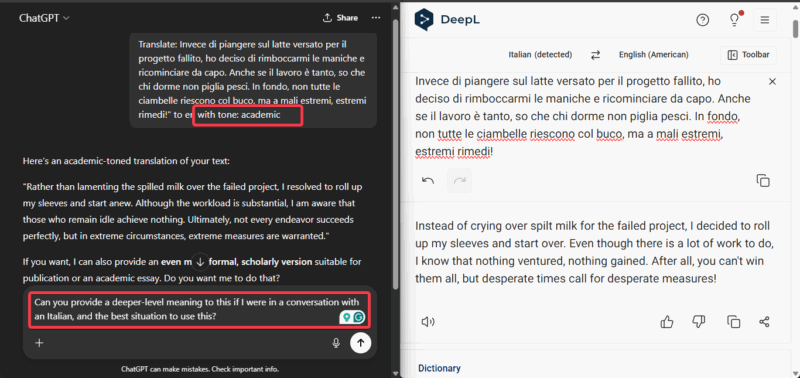
In short, Google Translate is about speed and scale, DeepL focuses on polished accuracy, and ChatGPT Translate works best when tone and clarity are priorities.
Weighing the Good and Not-So-Good for Daily Use
What I like most about ChatGPT Translate is how it saves time in real conversations. The translations often sound natural right away with no need for extra editing. Hence, it reduces those awkward moments when a literal translation confuses everyone.
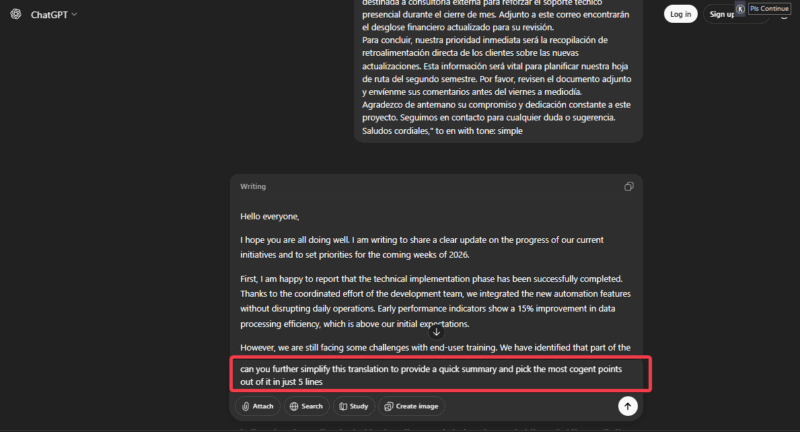
It’s free and easy to use, which makes it appealing for casual communication, learning, or remote work. It also blends well if you already use ChatGPT for planning and organizing your work.
Privacy is where you need to slow down. Text entered into ChatGPT Translate may be used to help train AI models unless you opt out through OpenAI’s data controls.
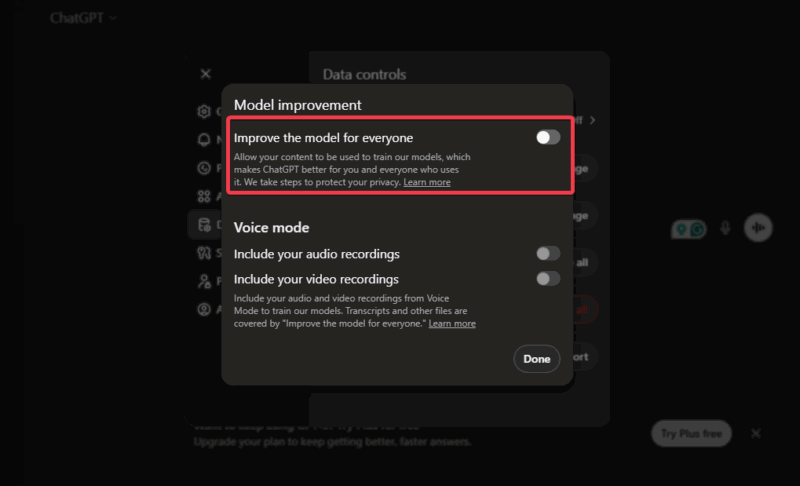
This doesn’t mean your data is automatically misused, but it does mean you should avoid sharing sensitive documents like contracts, medical details, or work secrets if you choose not to opt-out.
There are also practical limits. Results can be inconsistent even if you run the same text again, especially if you tweak the prompts. This can be frustrating if you expect identical results every time.
Also, the tool is web-only and slower for quick lookups or large blocks of text.
ChatGPT Translate works best for low-risk situations where understanding and tone are more important than speed or volume.
Using ChatGPT Translate and Quick Tips
Head to chatgpt.com/translate. You’ll need a free account if you don’t have one. Input your text, and select the target language.
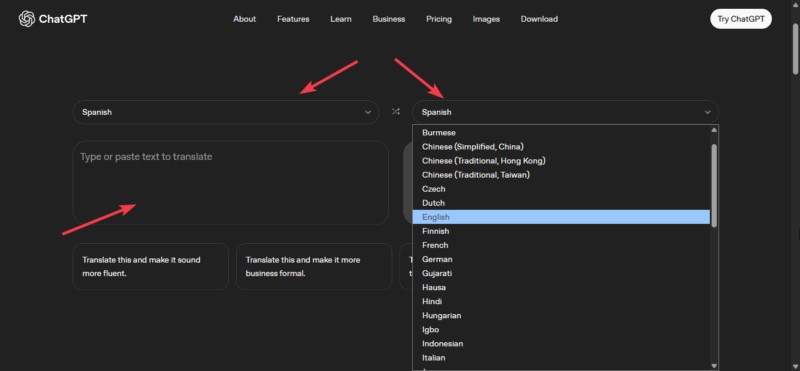
Note: Text input is available now, while voice and image features are rolling out soon.
Add instructions like “translate this email formally and explain any idioms” or “keep it conversational” right in the prompt for better results.
Always review important translations. AI tools are helpful, but they still make mistakes sometimes.
If you already use ChatGPT for image editing or team collaboration features, adding translation to your routine will feel natural.
ChatGPT Translate will not replace Google Translate for everyone, but if you care about context and tone, I would advise you give it a try.