
Apple products are usually security fortresses, but a new macOS security flaw could leave you exposed to hackers. The worst part is it completely bypasses Apple’s privacy controls. There are some ways to keep yourself protected.
macOS CVE-2025-43530 Security Threat
Security researchers recently discovered a macOS security flaw they’ve tracked as CVE-2025-43530. In most cases, Apple devices have built-in security and privacy features that block or at least warn users of potential threats.
In this case, the flaw silently bypasses Apple’s TCC (Transparency, Consent, and Control). The TCC is designed to run in the background and protect users from unauthorized access to their documents, microphone, camera, and other areas that could compromise a user’s privacy and safety.
The issues stem from two vulnerabilities. Once combined, hackers are able to gain access to your system.
Naturally, macOS systems trust Apple-signed system services without any additional checks. Hackers slightly modify the binary, turning trusted processes into a malicious one. Since it still shows as Apple-signed, macOS sees it as a legitimate and trusted system service. There’s no check for modifications, letting hackers sneak in.
The second vulnerability involves TOCTOU (Time-of-Check-Time-of-Use). It’s a tiny timing gap between when macOS verifies a process and actually executes the process. The malicious code is injected during this gap. So, your system has already verified the process as safe before anything is wrong.
Hackers use these two flaws to execute AppleScript commands and send AppleEvents to other apps on your system. Once in, hackers gain full access to user files, user data and input, microphone audio, and more. Since your system trusts the process, you don’t get any warnings or permission dialogs.
Currently, one of the biggest entry points is the VoiceOver screen reader service. Since it needs such wide access to your system, it’s the perfect way for hackers to gain as much access as possible when exploiting the vulnerabilities.
Update macOS Immediately
Your first line of defense is to update your system with the latest security patches for macOS Tahoe 26.2. This includes an update to VoiceOver addressing CVE-2025-43530.
Open Settings from the Apple menu, click General in the left pane, and open Software Update in the right pane. Your system immediately starts checking for available updates. Click Update to start installing the latest update.

If you update automatically, your system should have already updated.
If your Mac isn’t compatible with Tahoe 26.2, there are still several ways to keep your system protected.
Review App Permissions
Regularly review app permissions on macOS. For apps you never use, revoke all permissions. For apps you regularly use, ensure there aren’t any extra permissions you don’t need.
If you notice questionable app permissions, it could be a sign your system’s been compromised. Even if you don’t use VoiceOver, hackers may still be able to exploit the vulnerabilities to hijack your system. Revoking permissions of the service helps protect you.
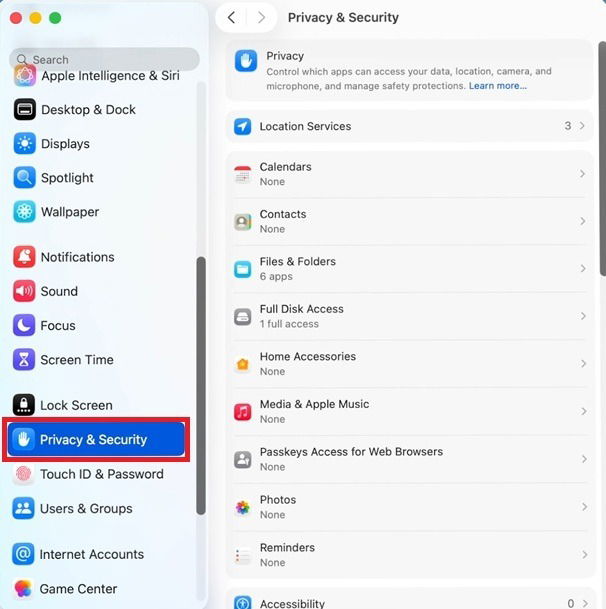
Open Settings -> Privacy & Security. Then, review permissions per app or by type of access. For instance, click Microphone to view which apps have access to your microphone.
Switch to Third-Party Tools
Despite the macOS security flaw being patched in macOS Tahoe, this doesn’t mean the vulnerabilities aren’t still in older versions. Of course, always stick to trusted, updated alternatives to built-in Apple services. For instance, Speechify is a great alternative to VoiceOver.
There are numerous alternatives for Apple tools. Yes, using the built-in options is easier, but if you’re using an older system that may not be patched, it’s a safer option.
I do recommend keeping any third-party tools up to date. Unlike with built-in Apple tools and services, many third-party tools don’t auto update. Make a habit of checking for updates at least once per week or month for frequently used tools and apps.
Install Third-Party Anti-Virus
Apple does a great of locking down macOS to keep you safer. That doesn’t mean it’s perfect. While you should always take advantage of the built-in settings to fully secure your Mac, it’s also a good idea to install a third-party antivirus.
While hackers may get around Apple’s TCC, a reputable antivirus often detects unusual scripts and events. Then, it helps you remove the problem. Of course, in some cases, you may have to factory reset and start fresh to ensure your system isn’t still compromised.
Try to use an antivirus that offers more than just basic scanning. You want real-time protection, phishing protection, firewall integration, and more. Malwarebytes and Intego Mac Internet Security X9 are good options to consider.
Avoid Downloading Untrusted Files
Something as simple as downloading a free PDF could compromise your system. Not only could hackers exploit the new macOS security flaw, but they could gain access through other vulnerabilities, especially in older systems.
This is another reason to double your protection by using Apple’s built-in tools and a third-party antivirus to catch nearly anything malicious. Protecting yourself from CVE-2025-43530 requires a multi-layer approach that also helps you stay safe from future threats.