


Sometimes while using an older laptop or PC, the mouse clicks fail to respond in time, and the touchpad button may appear jammed. You shouldn’t feel stuck in such a situation, as the text selection can still be achieved very easily. All you have to do is enable the caret browsing mode, and it will help you practically do away with the mouse/trackpad pointer. Here you will learn about what caret browsing is and how you can enable it in various browsers.
Also read: How to Make Private Browsing Mode the Default in Various Browsers
What Is Caret Browsing?
Caret browsing is a useful browsing method which allows website navigation and text selection using the Shift and Arrow keys on your keyboard. When you enable this mode in your browser, text selection and scrolling speeds will be controlled by a blinking “vertical line” cursor (also called a “caret”) rather than a mouse or trackpad pointer. Clearly, caret browsing is one of the best accessibility tools for heavy keyboard-centric users.
The technique to enable caret browsing is rather easy. [All you have to do is press the F7 key to turn on/off the caret browsing mode. It is operating system-agnostic and works equally well on supported browsers on Windows, Linux, and macOS.
How to Enable Caret Browsing in Your Browser
Whether you use Google Chrome, Microsoft Edge or Mozilla Firefox, the method to enable caret browsing is exactly the same. You only need to enter the F7 key and, the cursor navigation mode is turned on. It is, however, not supported in Opera and many other browsers.
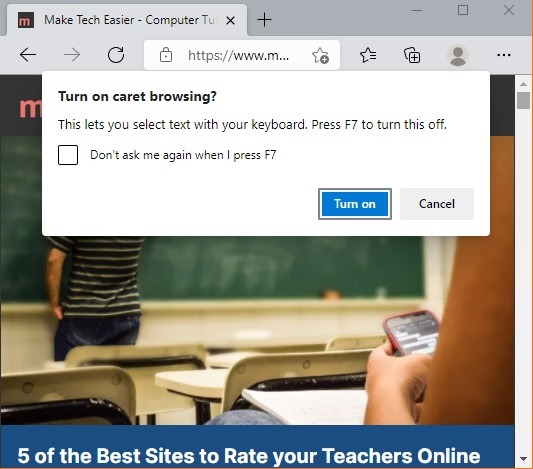
Turning off caret browsing is as easy as pressing the F7 key again.

Once the caret browsing mode is enabled, you don’t need to select any text using the mouse or trackpad. Just position the cursor using arrow keys at the beginning of a line. From there, you can select the text using the Shift and Right Arrow keys.
For backspace text deselection, simply use the Shift and Left Arrow keys.
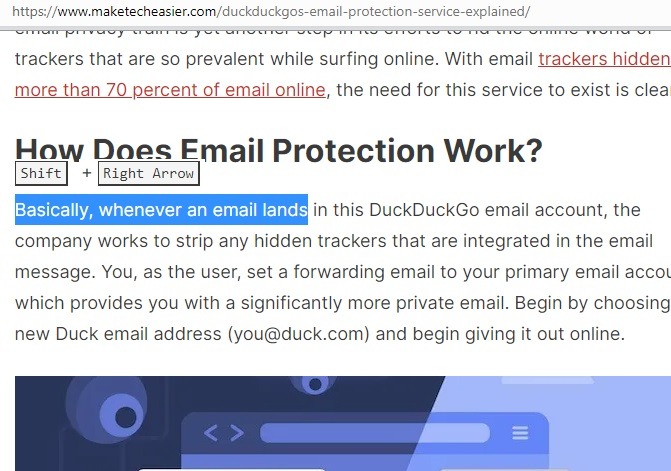
Using Shift with Up Arrow repeatedly will select preceding lines on top of the existing cursor position. Instead of that, when you use Shift with Down Arrow, it will select the succeeding text lines.

When you use Shift with mouse clicks in the right-hand corner, it will select each and every line one after another.

Applications of Caret Browsing
Despite its versatile uses, caret browsing is not that well-known by many. It’s a superb productivity technique and can save a lot of time and effort in text selection. You’ll find caret browsing useful in the following settings.
- When mouse or trackpad is stuck: sometimes the mouse or trackpad appears to freeze for no reason. By enabling the caret browsing mode, you can continue scrolling down a webpage and selecting the text with the keyboard.
- On right-click disabled sites: some sites disable right-click selection for copyright or security/privacy reasons. If you need to select the text, you get a warning that right-click is not allowed on the webpage.

With caret browsing enabled, you can override this restriction using your keyboard alone.
How to Enable Caret Browsing When F7 Key Doesn’t Work?
This is an extremely rare problem. On some keyboards, the F7 key is stuck or not working. You can instead use the onscreen keyboard to enable/disable the caret browsing setting once. Or you can use a Chrome extension called “Caret browsing,” which does the same selection in lieu of the key. This extension is supported on Edge browser as well but not with Firefox.
Caret browsing is a smart alternative text selection technique, which is fun to use and is extremely dependable for keyboard-centric users. Do you know you can also use voice typing in Microsoft Edge? It works quite well, and you don’t even need to type on the keyboard much beyond fixing a few spelling errors.