


In a world that is increasingly mobile, you may find yourself on a trip, needing to access the Internet on a PC. But maybe you are worried about using a public machine to do personal searches or work on an online app. One way to fix this is to have access to a portable browser that you can use anywhere.
A portable browser is a version of a browser the developer packages so you can use it directly from a portable storage device like a USB drive. By using the portable version of a browser, you can use all of your bookmarks, history, private mode, and extensions without leaving any traces on the computer that identifies you.
Advantages of Portable Browsers
If you are on the go for work or vacation and need to use a public computer, you will not be able to install any new software on the machine. So, having a copy of the browser handy you want to use makes accessing the Internet easy.
Using a portable browser means there is no need to install the software on the machine, which saves you time. Portable browsers are lightweight and run faster than the regular version of the software without slowing the computer down. Portable software also does not leave any traces of the activity on the Windows Registry.

And you probably don’t want to use the installed version of a browser for fear of leaving personal information behind. Portable browsers are great for this because when you use a portable browser, all of your info is saved on the storage device, not on the computer.
Examples of Portable Browsers
Some portable browsers are versions of popular web browsers like Chrome, Firefox, and Opera. They have the same functionality and performance as the original software.
There is also a wide selection of other portable browsers from lesser-known sources such as Chromium, Avant Browser, Midori, and QtWeb. These will be good choices if you don’t need your extensions and bookmarks. You just want to keep traces of your activity off of the other computer.
How to use Portable Browsers
There may be slightly different methods for downloading any given portable browser, but it should work like this one:
1. Visit the application’s download page. You can use any of the links above to reach the browser you would like to use.
2. Click the Download button and save the file to your PC.
3. Browse to the location of the “AppNamePortable_x.x.paf.exe” file you downloaded.
4. Double-click the file to start the installation.
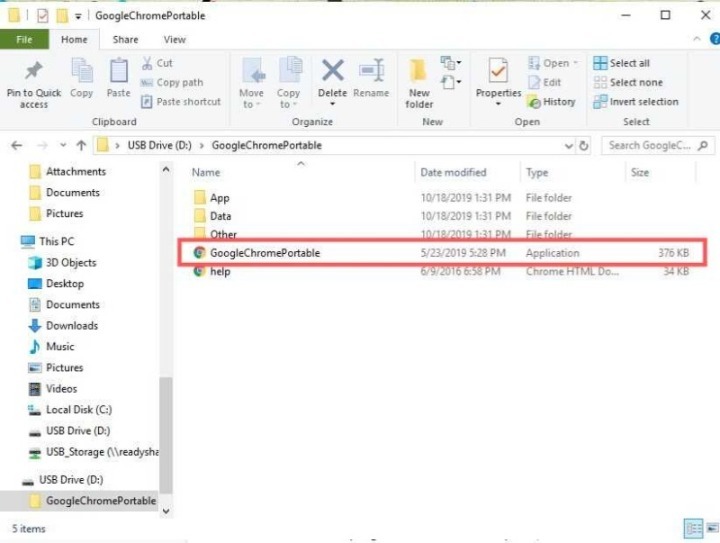
5. Follow the on-screen prompts.
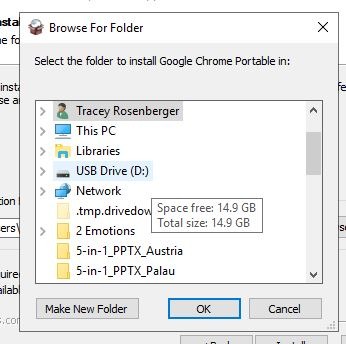
6. When you come to the screen that asks where you want to save the file, you will need to change this to your USB drive.
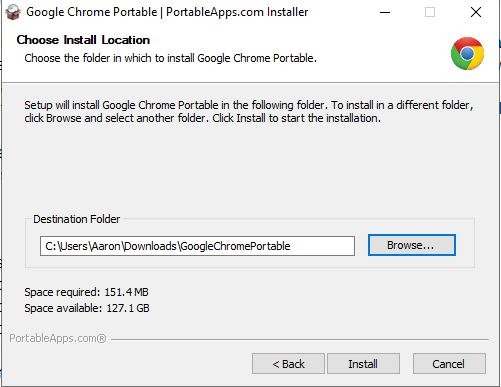
7. Once you have selected the location, click OK.
8. Click Install.
To use the program on another computer:
1. Insert the USB drive into the computer port and browse to the directory where you installed the program.
2. Double-click the “AppNamePortable.exe” file.
3. Now, sign in and use the app as you would the regular version.
If you want to have the Internet on a PC at your fingertips without worrying about giving away personal information, choose your favorite browser, and download the portable version to a flash drive or other portable storage. Then you can take it with you everywhere you go. Don’t forget to also check out some other portable apps you can use on Windows.