

If you are like me, you browse a lot, and you probably hate Internet Explorer. You’d think that because Windows 10 comes with Microsoft Edge as the default browser, you’d be able to get rid of Internet Explorer once and for all. But you’d be wrong because Windows 10 comes with Internet Explorer 11 preinstalled. The good news is that although you cannot uninstall it, you can turn it off. But, before you turn it off, it’s important first to know its role so you can make a more informed decision.
Why Microsoft bundles Windows 10 with Internet Explorer 11
Microsoft Edge is designed for the modern Web, which means some websites that use old technologies might not load correctly in Edge. For this reason, Microsoft continues to include IE 11 so as to offer a seamless browsing experience and compatibility support for websites that use old technologies. Also, Internet Explorer allows Windows 10 users to access NPAPI plugin content like Silverlight and JAVA.
However, if you rarely come across those old websites that require the use of Internet Explorer, or prefer to use alternative browsers such as Firefox or Google Chrome to open such pages, Microsoft provides an easy way to completely disable Internet Explorer. Here’s how to turn off IE 11 in Windows 10.
How to turn off Internet Explorer in Windows 10
To turn off Internet Explorer, simply follow the steps below.
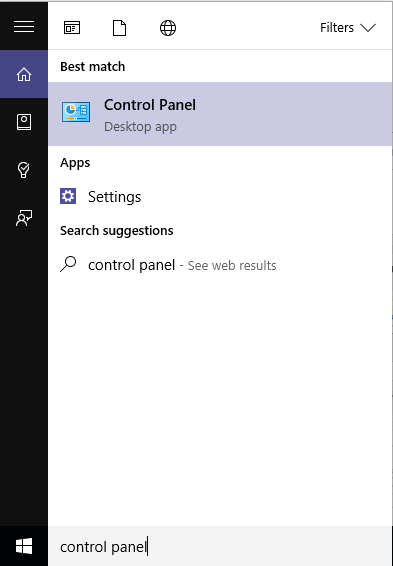
1. Right-click the Start Menu and select Control Panel. Alternatively, you can just type “Control Panel” in the search box and launch it from the search results.
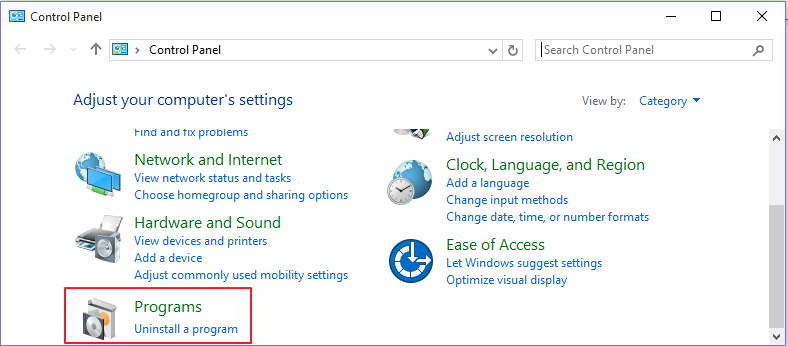
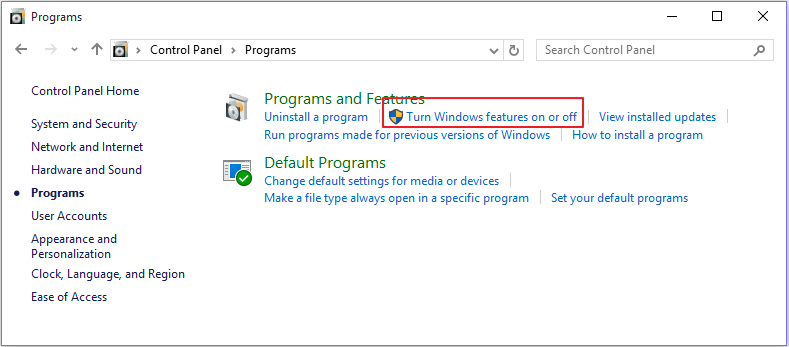
2. On the Control Panel screen locate the ‘”Programs” category and click on “Programs.”
3. In the “Programs and Features” section click the “Turn Windows feature on and off” link. This will open the Windows Features dialogue box.
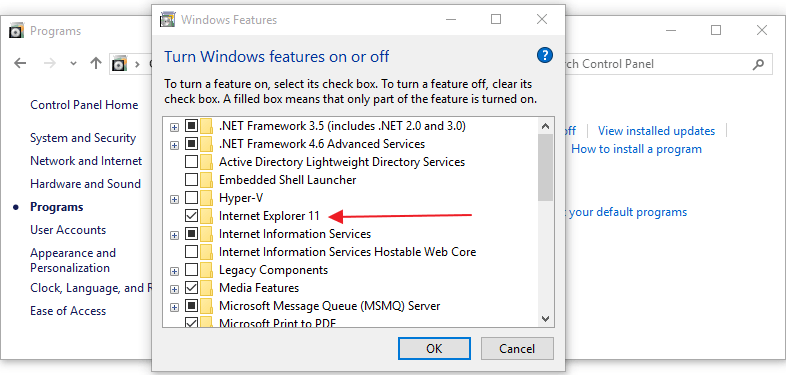
4. Scroll down until you reach the “Internet Explorer 11” option. Click to uncheck it. You should follow the same procedure to disable the older versions of Internet Explorer in Windows 7, 8, and 8.1.
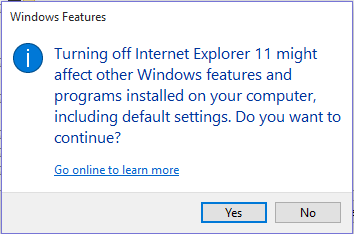
5. A warning dialogue box will pop up saying that disabling IE 11 might affect other programs including your default settings. Click “Yes” to continue, then click “OK” on the Windows feature dialogue box.
6. Windows will display the progress dialogue box as it searches for files, and then it will apply the changes. Once the system has finished applying the changes, you will be prompted to restart your computer.

You can click the “Restart now” button to have the changes effected immediately or the “Don’t restart” button if you intend to reboot the computer later. Note that Internet Explorer will not be turned off until your computer has been restarted.
Conclusion
Once you’ve turned Internet Explorer off, it will not be available on the “Set Default Programs list” on the control panel, nor will you find it listed under “Accessories” in the Start menu. The “Open with Internet Explorer” option will still exist in the Edge menu, but it won’t work. Also, Windows will move all of IE’s associated files to a different storage location so that you can get it back should you ever wish to restore it in the future.
However, this does not remove all traces of Internet Explorer as some processes will still rely on its rendering engine. Perhaps you would also enjoy reading our article on why Internet Explorer is getting more dangerous where browser security is concerned.
Image credit: Internet Explorer symbol