Syncing your iPod Touch with iTunes on your Mac or Windows is a no-brain job. Simply plug in your iPod, fire up your iTunes and your synchronization will be done in a minute. However, since there is no Linux version of iTunes, there is almost no way that you can sync your iPod Touch with your computer. If you are using an Ubuntu system and you don’t want to create a Windows/Ubuntu dual boot just to sync your iPod Touch, here’s a tutorial that teaches you how to sync your iPod Touch with a WinXP virtual machine in Ubuntu Intrepid.
(This tutorial was tested using a iPod Touch 1st generation. I have not tested iPod Touch 2nd Gen, iPhone 2G/3G, but I guess they should work as well.)
Install Virtualbox
(skip this step if you have already installed Virtualbox in your system)
Add the Virtualbox repository to your Apt list. In your terminal:
gksu gedit /etc/apt/sources.list
Add the following line to the end of the file. Save and close.
deb http://download.virtualbox.org/virtualbox/debian intrepid non-free
Add the gpg key
wget -q http://download.virtualbox.org/virtualbox/debian/sun_vbox.asc -O- | sudo apt-key add –
Update the repository and install Virtualbox
sudo apt-get update
sudo apt-get install virtualbox-2.0
During the installation, you will receive a prompt to ask you to add users to vboxusers group.
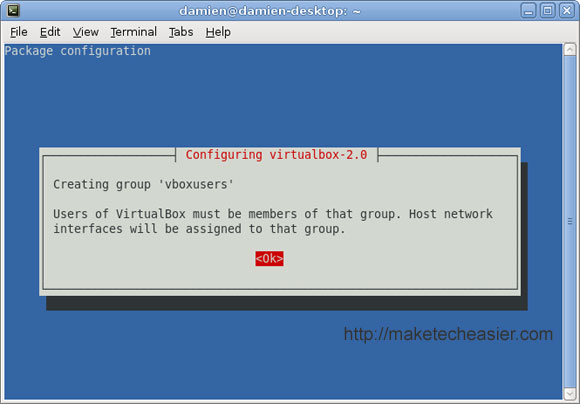
click OK to continue.
You will then receive the next prompt to recompile the kernel for vboxdrv
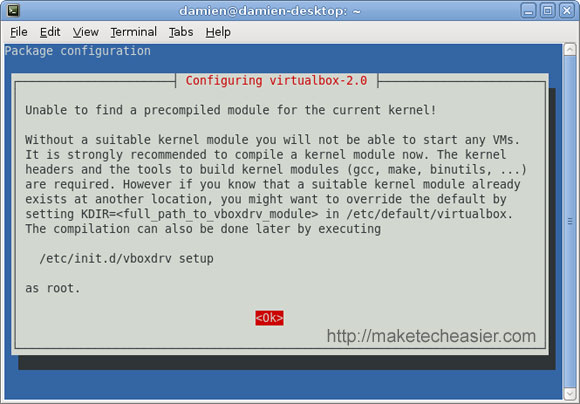
click OK to continue, follow by Yes to compile the vboxdrv kernel.
When installation is completed, you need to add yourself to the vboxusr group.
Go to System -> Administration -> Users and Groups
Press the Unlock button. Enter your password and Authenticate.
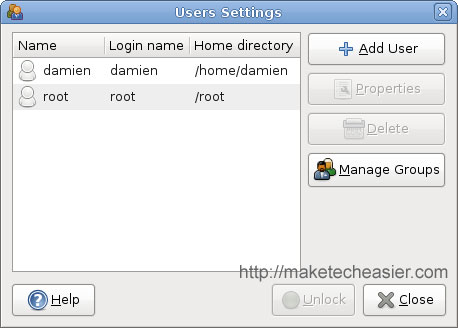
Press Manage Groups.
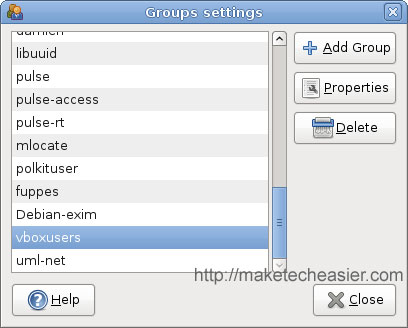
Scroll down until you see the vboxusers. Highlight it and click Properties.

Check your username and click OK. Close everything.
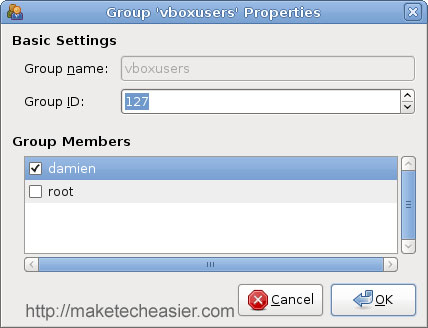
Remember the Group ID (in this case, the group ID is 127). You will need to use it later.
Back in the terminal,
echo “vboxdrv” | sudo tee -a /etc/modules
to start the vboxdrv module during bootup.
Configuring the USB support
The following is to configure the Virtualbox to detect any USB devices that are plugged into your system.
gksu gedit /etc/fstab
Add the following line to the end of the file
#usbfs for virtualbox
none /proc/bus/usb usbfs devgid=GROUP_ID,devmode=664 0 0
Replace the GROUP_ID by the group ID that you have recorded just now.
Recompile the kernel USB support
In the terminal, type
uname -r
You should see something like this
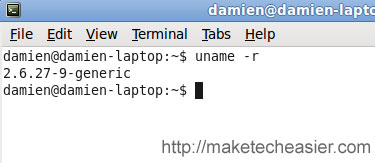
Next, using the kernel information you just obtained, install the source code of the kernel
sudo apt-get build-dep linux-source-2.6.27
sudo apt-get install linux-source-2.6.27 build-essential
Once it is done, type the following to the terminal, line by line
tar -jxvf /usr/src/linux-source-2.6.27.tar.bz2
cd linux-source-2.6.27/drivers/usb/core
perl -pi.bak -e 's/16384/131072/' devio.c
make -C /lib/modules/`uname -r`/build/ M=`pwd` modules
strip --strip-debug usbcore.ko
sudo install -m644 -b usbcore.ko /lib/modules/`uname -r`/kernel/drivers/usb/core
sudo depmod -ae
sudo update-initramfs -u
Reboot the computer.
Install Windows XP in your Virtualbox. (skip this step if you have already done so).
Connecting iPod Touch to Windows XP VM
Plug in your iPod Touch using the USB cable.
Ubuntu will detect it and ask if you want to open it with F-spot manager. Click Unmount
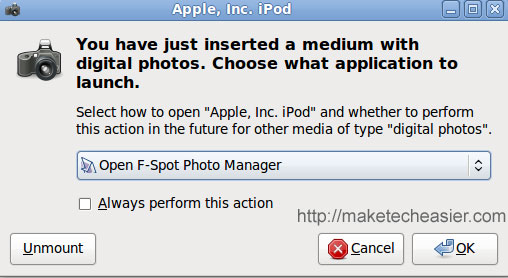
Next, open your Virtualbox and boot up the Windows XP VM.
Install iTunes in your Win XP VM.
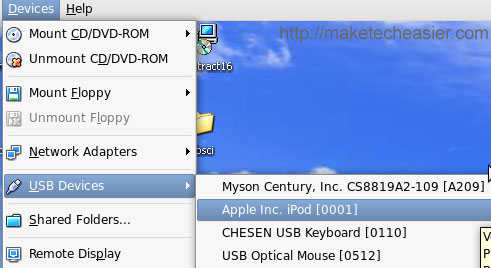
Activate the iPod Touch by going to Devices -> USB Devices -> Apple Inc. iPod

The WinXP VM should recognize the USB device and configure it for usage.
Open your iTunes. You should be able to sync it like you do in a native Mac or Windows environment.
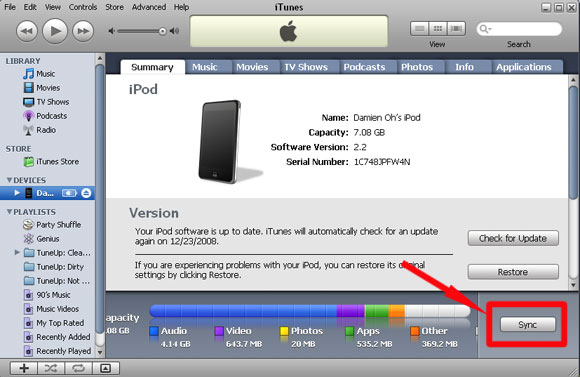
That’s it.
Note: I have tested this with a iPod Touch 1st Generation. I have not tested this with iPod Touch 2G and iPhone, but they should work as well.
[Reference: Ubuntu Forums]
upon doing this my ipod when plugged in is not detected. same thing with usb mouse. please help me becasue this is a very big deal.
Do you mean your Ubuntu doesn’t recognize your iPod/mouse or the Virtual machine?
When you compile the USB kernel, did it show any error message?
i have the same problem, ubuntu doesn’t recognize any usb devices. there are errors while compiling the usb kernel:
ulrich@ulrich-laptop:~/linux-source-2.6.24/drivers/usb/core$ perl -pi.bak -e ’s/16384/131072/’ devio.c
Unrecognized character xE2 at -e line 1.
i have the same problem, ubuntu doesn’t recognize any usb devices. there are errors while compiling the usb kernel:
ulrich@ulrich-laptop:~/linux-source-2.6.24/drivers/usb/core$ perl -pi.bak -e ’s/16384/131072/’ devio.c
Unrecognized character \xE2 at -e line 1.
I have the same problem as the above user, and honestly i did not notice if there were any errors.
Problem for is that my keyboard also uses USB and is not recognized aswell as my mouse, and now I am unable to do anything in Ubuntu 8.10.
Great guide though, but can you help us getting USB support back somehow.
Much appreciated.
Mikael
Well, with the 2G touch, Ubuntu won’t even pick up the connected Ipod as a drive even though the ipod is charged. So Ubuntu doesn’t detect the 2G. What’s up with that or I’m wrong here? Please send me an email if you have a solution. Thanks.
I have checked through the code. It seems that WordPress has condensed two dashes into one. One of the command should
strip --strip-debug usbcore.ko. I have make the amendment in the article. Try to recompile the USB kernel again. Let me know if it works.Been searching all over, but can’t find a solution.
When I boot into the latest kernel of Ubuntu 8.10, I loose all usbports, this means that I can’t use either keyboard or mouse AT ALL. The same goes if I try to boot into recovery mode.
Now I can boot the older kernel (I can’t remember the numbers), where I do get USBports. Now how do I go about getting the latest kernel working again?
Since as of now I am unable to input anything to correct my system. And therefore also unable to rectify what you have put above.
Cheers
Mike
OK got it fixed.
By finding a PS/2 mouse, and dragging dropping code, I was able to fix my problems, keyboard and mouse is now working.
Thanks to this article, I can now sync my Ipod touch 2G from Ubuntu 8.04 and Windows xp as a guest. Although Itunes in VB is a tab slow in a Pentium 4 2.8ghz 1gb RAM.
You need latest virtualbox version 2.1 I download it from http://www.virtualbox.org
Smooth sailing from here.
Got VB, Windows XP and OSX now running with my usb mouse and keyboard.
Even made my music and photos folders into network drive under the windows xp guest, so now I can work with my music and photos in Ubuntu and then just startup the winXP guest to sync.
Works like a charm
Thanks
Glad it all work out for you.
I just want to say super thanks. As someone who was gifted an ipod touch 2g and absolutely hates itunes i am forced to use it since no alternative software deals with the hashing algorithm for it. As such, I had two options, use my wife’s laptop which is annoying or get windows working on mine (whether by partitioning or VM). I’ll try the VM and see how it goes.
As a plus, i’m hoping i’ll also be able to do decent video editing again too, since all the video editing tools i’ve used in Ubuntu have been totally unstable. Apart from that i love Ubuntu, but the ipod and video editing have been my stumbling blocks.
Daniel
Big Tip!
Gracias
Thx for the guide!
I have a problem, anyway.
I’m using the 8.10 Ubuntu in Italian.
When I try to update the kernel (sudo apt-get build-dep linux-source-2.6.27), the terminal gives me this error lines:
dpkg: syntax error: unknown group `uml-net’ in statoverride file
E: Sub-process /usr/bin/dpkg returned an error code (2)
E: Il calcolo delle dipendenze per la costruzione è fallito
Can u help me?
Gio
Hi so far ive been following your guide step by step however, i go to this step
“Next, using the kernel information you just obtained, install the source code of the kernel”
and i don’t know what to do from there.
can someone please help me?
thanks
@ Carrie. It means to take the number from the terminal, in his case it was 2.6.27-9. and put in in the code that is listed below. Which, in his case is
sudo apt-get build-dep linux-source-2.6.27
and
sudo apt-get install linux-source-2.6.27 build-essential
so if your number is 1.1.11-1 your source code would be
sudo apt-get build-dep linux-source-1.1.11 understand?
yes thanks you for replying, the number i get is the same as his 2.6.27-9 and when i enter 2.6.27 ( the code he gave) this is what i get
E: dpkg was interrupted, you must manually run ‘dpkg –configure -a’ to correct the problem.
any idea what that means?
Thank you so much, this worked like magic for my iPod Touch 1G on 64-bit Intrepid. I’d seen other guides and was trying to avoid kernel stuff at all costs but this was easy as pie to follow. Cheers!
Hi, I have a some doubt, i had installed the win xp first and i was not configure the UsB port because i did not know what you said. So my doubt is i have to do the same thing or a diferent procedure to synchronizing mi ipod in Vbox Win Xp. another what i have to type in the following part make -C /lib/modules/`uname -r`/build/ M=`pwd` modules ‘uname -r’ i know what but in ‘pwd’ what i have to type there.
I just got a Touch 2G foir my birthday, and I wasn’t able to sync in Virtualbox up to about 3 minutes ago. I had the 0xE8000035 message in iTunes. Turns out that my USB support in VirtualBox was working, but that particular virtual machine was configured with USB 1.1 only, the option for 2.0 was not checked. After enabling that option, iTunes 8 works really nicely!
Thanks for the nice tutorial, it proved useful for debugging!
hi, i get this output when i run the command
make -C /lib/modules/`uname -r`/build/ M=`pwd` modules
make: Entering directory `/usr/src/linux-headers-2.6.27-7-generic’
CC [M] /home/mo/linux-source-2.6.27/drivers/usb/core/message.o
/home/mo/linux-source-2.6.27/drivers/usb/core/message.c: In function ‘usb_disable_device’:
/home/mo/linux-source-2.6.27/drivers/usb/core/message.c:1094: error: ‘struct usb_interface’ has no member named ‘unregistering’
make[1]: *** [/home/mo/linux-source-2.6.27/drivers/usb/core/message.o] Error 1
make: *** [_module_/home/mo/linux-source-2.6.27/drivers/usb/core] Error 2
make: Leaving directory `/usr/src/linux-headers-2.6.27-7-generic’
Hi,
All went well until I typed in “sudo apt-get install linux-source-2.6.28 build-essential”.
It then came back with E: Couldn’t find package build.
Any ideas, would be grateful,
John