The Internet has completely changed the way we shop. In the past we were forced to get out of the house and move from shop to shop to find the required item at the best price. Now we can get almost anything right at our doorstep, and moving to another store is just a matter of opening a new tab in a browser.
The convenience offered by online shopping is great, but that doesn’t mean you should blindly buy any item online. There are many scams, security breaches, identity theft and other risks involved in online shopping. Additionally, you have access to thousands of online stores, thus making it hard to find the best deal for your required item. To help you shop smartly, we are listing six online shopping tips.
1. Online Store Security
You need to make sure that your connection with the online store you are buying from is secure. Almost all reputable shopping stores use encryption to protect the buyer’s information. To ensure your connection with the online store is encrypted, look for the “Green Padlock” icon at the start of the address bar. The website address should also start with “https://” instead of “http://.” If you don’t see the padlock icon and the address starts with “http://,” don’t buy from that online store. If the store doesn’t care about your security, then there is no point in buying from it.
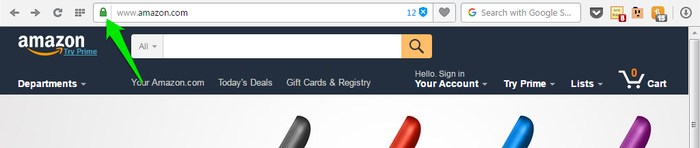
Furthermore, protecting your account in the online store is important as well, as it will probably contain your credit/debit card information, which when compromised could be devastating for you. Make sure you use a strong password and never give up this information to anyone.
2. Secure Your PC and Browser
A secure connection is not the only thing you need to worry about. Your PC and your browser should also be protected, as many malware or malicious programs can steal your information. There are many measures you can take to secure your PC and your browser, but a good antivirus is something you should consider first. Scan your PC for malware often to ensure you don’t become victim to a malware such as keyloggers that will steal your login credentials.
3. Take Advantage of Shopping Apps and Extensions

There are tons of shopping apps and extensions that can help you easily find the best deals from thousands of stores to save money and time. These tools can find the best deals on your item by searching for it in thousands of stores and can tell you where you can get the best price or special offers. Basically, these tools will take all the hard work out of your shopping and help you easily get the best deal (including coupon codes). Apart from apps and extensions, there are also some websites that can help you with your online shopping; below a few of them are listed:
- Groupon
- Slickdeals
4. Don’t Stick with a Single Online Store
Many people just stick with a single online store that they trust, such as Amazon. Most probably your required item will be listed on hundreds of websites, and the price will be different from store to store. If you stick with your favorite store (or a few stores), you will miss out on so many cool deals on the same item. When you want to buy an item, keep yourself open to all of the reputable stores.
5. Phishing Attacks
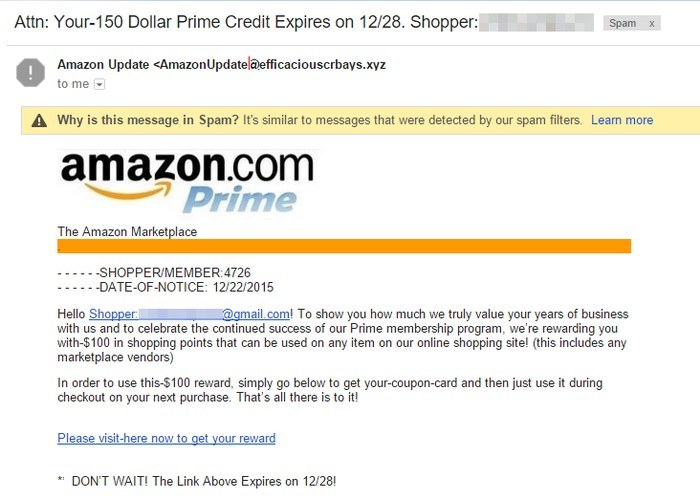
Phishing attacks are one of the biggest threats to online shoppers. Anyone can create a dummy website page and tell you to log in and purchase the product from that fake page to get huge discounts. If you do provide your information, they will compromise your account and steal whatever they can. I have written an extensive guide on how to recognize a phishing attack and counter it. Do check it out if you are concerned about phishing attacks.
6. Keep Up with Your Favorite Store
One thing that helped me many times with online shopping is keeping up with the latest updates from my favorite store. Almost all stores have some kind of newsletter and social media presence. If you particularly like a store’s offers, then you should follow their social media networks like Facebook or Twitter and sign up for their newsletter. Stores update about the latest offers and items in stock using these channels and will immensely help you in getting great deals. Sometimes you may also get special discounts that are only being updated on the social media channel of the online store.
Of course if you sign up for the newsletters of all your favorite stores, your email account could get flooded with offers you may not care about. However, you can always unsubscribe from newsletters if they are not of much use.
Conclusion
Above are some simple tips to keep you safe while online shopping and find the best deals. If you shop often, then I recommend you give the Avast Safe Price Chrome extension a try. It always helps me find great deals while I am shopping, and in most cases they are twenty to thirty percent cheaper. On top of that, always carefully read the shipping and return policies of the merchant you are buying from; sometimes a cheaper deal comes with bad return policies.
Do you know any other cool online shopping tips that could make shopping safer and easier? Share with us in the comments.








