Email isn’t exactly easy to manage. It never stops arriving, and half of what shows up is junk. GMail does what it can to cut down on the amount of junk and spam, but sometimes the responsibility still falls on you.
One option for controlling your email conversations through GMail is to mute and unmute conversations as needed. Muting a conversation lets you stop notifications from a specific conversation and remove it from the inbox without actually deleting it. This is especially useful if you’re being “spammed” with notifications in the short term. Facebook messages would be a good example of that type of situation.
Muting a conversation in Gmail
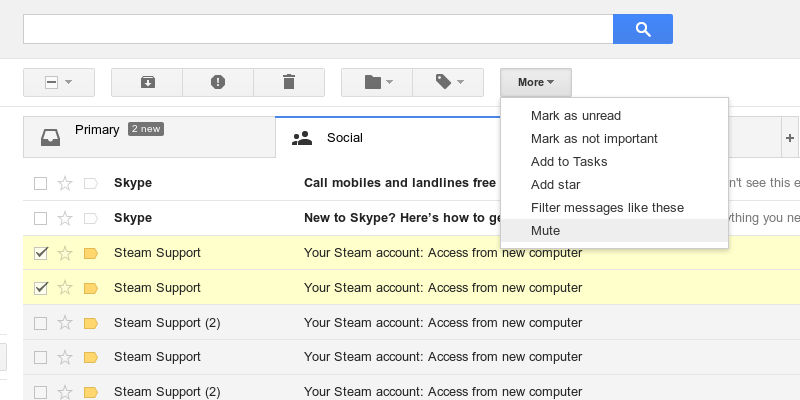
Muting a thread/conversation is very simple. All you need to do is select an email conversation by checking the box next to the subject. Then, open the “More” menu and select “Mute.” The conversation will immediately disappear from your inbox, and you will no longer receive notifications from that thread.
If you have more than one problematic conversation, you can absolutely select them all at once and mute them at the same time.
Unmuting a conversation in Gmail
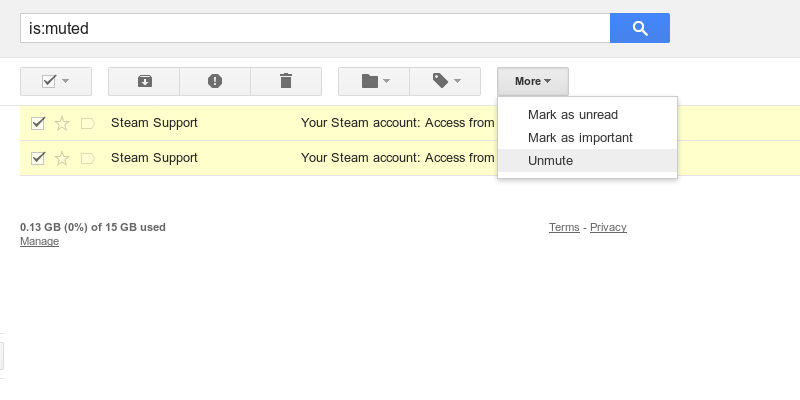
Unmuting a muted thread is almost as simple. Muted conversations are hidden, but they aren’t deleted. You can still search for them. If you know the exact subject of your conversation, you’d probably be fine searching for that. Otherwise, use GMail’s search feature, and enter is:muted. That will search for all conversations with the “muted” status.
Just like before, you can click the checkboxes next to the conversations you want to unmute. Then, use the same “More” menu which will now show an “Unmute” option to unmute your conversation(s).
After you unmute, the conversations will appear as normal again. They’ll return to where they were in your inbox, and they’ll begin to push notifications to you again.
Additional Thoughts
Muted threads aren’t a solution to spam, only conversations that get kind of spammy. They’re certainly no cure for malicious or phishing email either.
Muted conversations do provide a way to temporarily stop an influx of notifications from particularly active threads without actually deleting them. You’re then free to unmute them when you’re ready and begin responding as needed.








