

Among the talks of the recent net neutrality debates, one word in particular keeps cropping up: “Throttling.” Unfortunately, even outside of net neutrality, bandwidth throttling is something users may experience on a daily basis. So what is throttling? When are users throttled and how do you know it’s happening to you?
What Is Bandwidth Throttling?
When you access the Internet, you do so via your Internet service provider (ISP). Of course, the ISP will (hopefully!) strive to give you the fastest speeds possible under your current plan. There are instances, however, where the ISP will deliberately slow down your Internet speeds. This is what “throttling” is, when your ‘Net experiences a manufactured slowdown performed by your service provider.
Why Is It Done?
With high speed Internet being at the forefront of entertainment, it doesn’t make sense as to why an ISP would deliberately make your connection slower. However, there are various reasons why an ISP would take this route.
During peak Internet times, an ISP may put a limit on your connection. This is purely due to the fact that a large amount of people are all using the same service at the same time. If the ISP believes their service cannot handle the weight of everyone downloading large files at fast speeds during peak times, they’ll throttle connections in order to maintain a stable service.
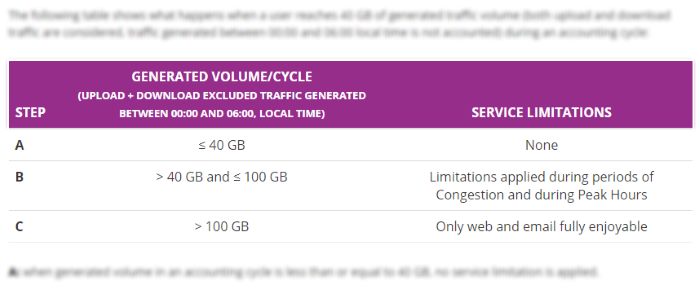
Likewise, an ISP may have a “fair usage policy” in their contract. This policy states that if a household or user downloads over a specified data cap within the space of a month, the ISP will throttle the connection until the next month. The ISPs say this action stops the networks from being consumed by a small percentage of power users, making it fairer for everyone else.
Throttling came into the spotlight during net neutrality talks. People were worried that should the concept of net neutrality be scrapped, ISPs would have the freedom to shape the Internet they provide. This opens up the gate to ISPs throttling or blocking websites as they see fit, such as those of their competitors. This topic has hit the news several times as ISPs have been caught throttling traffic speeds to sites they dislike.
Am I Being Throttled?
If you want to see if you’re being throttled, it can be a little tricky. There used to be a great tool called Glasnost that helped, but that has unfortunately closed down. If you want to see if you’re being throttled, you can do some manual sleuthing to find out.

While there’s no surefire way to get a “yes” or “no” for whether you’re being throttled, you can monitor your speeds using a tool such as SpeedTest over the course of the day and month. Checking at different periods of the day will tell you if your ISP throttles you during peak times, and checking every day from the first day of a month will tip you off to a fair usage policy activating if the speed suddenly plummets.
If you can, you can also try contacting your ISP’s customer support. Hopefully they should be able to tell you if a throttle is being applied to your account. They may also be able to tell you more as to why the cap was put onto your account.
What to Do From Here
If you believe your ISP is throttling your Internet, double check the terms of service for your ISP. Try to find if your ISP defined any conditions where they are allowed to throttle your connection.
- If there’s a time-based throttle, try to plan your heavy usage before and after the throttling occurs. This includes downloading movies and games you’ve bought, loading videos, or playing online games. Try to save the light Internet browsing for when the throttling kicks in.
- If it’s data-based, you can use software and tools to monitor the amount of data you’re using per month. Christopher wrote an article about how you can check your usage within Windows 10, and you can follow that to ensure you stay under the monthly limit. Alternatively, your router may be able to tell you your data usage when you log into it via a web browser. Check your router’s manual to see how to access this information.
If push comes to shove, it might be worth changing your service. Changing ISPs is an option, albeit the selection available to you may differ depending on your location. Some users may only have one ISP to choose from, while others have a whole host of ISPs vying for their attention. If changing your ISP won’t work, research buying a premium plan through your current service that won’t throttle its users.
Thinking of Throttling
With all the talk of ISP throttling, it’s worth knowing what it is and why it’s done. Now you know the basic details as well as how to know if your connection is being throttled.
How much does throttling affect your daily life? Let us know below.