

A browser cache is a storage area for data that computers use to speed up the process of loading webpages. It saves downloaded web page resources, such as images, videos, CSS, Javascript, and so on. The next time you visit the page, those resources are already there. In short, the browser cache allows your browser to load the page more quickly.
If your cache fills up, your browser can bog down. A variety of problems may occur, such as pages loading more slowly or incompletely. To solve this problem, you can delete all the information in the cache. Doing that speeds up your computer, but now your loading speeds slow down. Alternatively, you can increase your browser cache size.

How to increase browser cache size
Follow the steps below to increase the browser cache size in several of the common browsers you may be using.
Google Chrome
Google Chrome doesn’t provide a way for you to easily change the size of the browser cache. Here’s the workaround for Chrome in Windows:
1. Right-click on the Google Chrome shortcut on your desktop and select Properties.
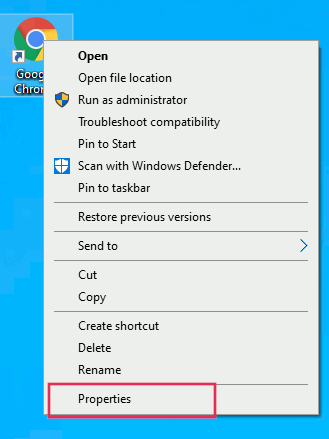
2. Click the Shortcut tab.
3. In the Target field, add --disk-cache-size=1073741824 (with the number representing the size of the cache you want in bytes. 1kilobyte = 1024 bytes) to the end of the path. Leave a space after the quotation marks at the end of the existing text before adding this information.
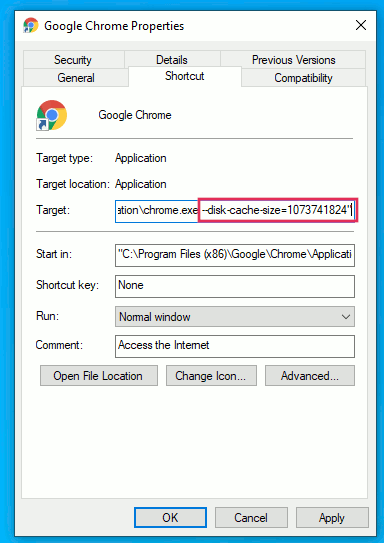
4. Click OK.
This trick should work for most Chromium-based browsers.
Firefox
The Mozilla Firefox browser does have a user interface to access the size of the cache and change it if necessary. Here’s how.
1. Open the Firefox browser.
2. Type about:config into the address bar.
3. Press Enter.
4. Accept the warnings.

5. Scroll down the alphabetical list to find (or search for) browser.cache.disk.smart_size.enabled.
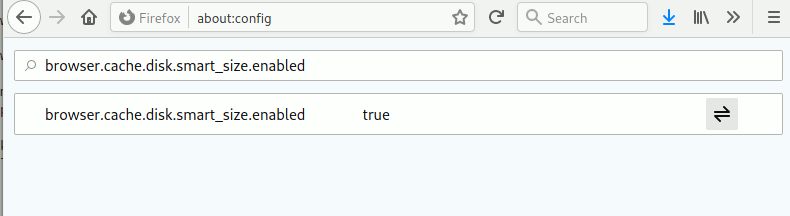
6. Click on the toggle switch to change “Value” from True to False.
7. Restart Firefox.
8. Now look for browser.cache.disk.capacity.
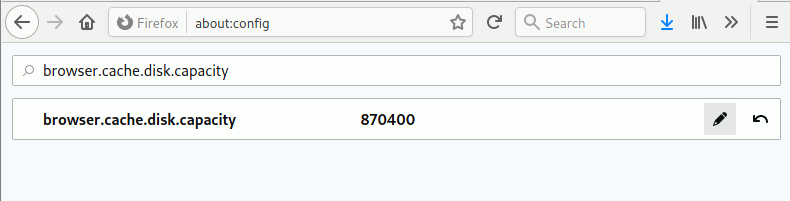
9. Click the pencil at the end of the row and enter the maximum size you want before restarting Firefox again.
That’s it. It is that easy to increase browser cache size. You should also look into creating various browser profiles for safer browsing. If you want to improve your browser’s performance even further, check out these tweaks to speed up your browser in Windows 10.