


With fiber, cable, and 5G all shooting data towards you at speeds easily reaching a gigabit per second, it’s a fantastic time for those of us who spend a lot of time daydreaming about download speeds. But how much bandwidth do we really need? Even the best-connected countries in the world are doing just fine with fifteen to fifty Mbps, and for everyday users, there’s essentially no performance increase. Aside from the natural human impulse of “more is better,” do we really need to download hundreds of megabits per second?
Measuring Internet speed

First, it’s important to get a basic understanding of exactly what some of these terms mean:
Mbps
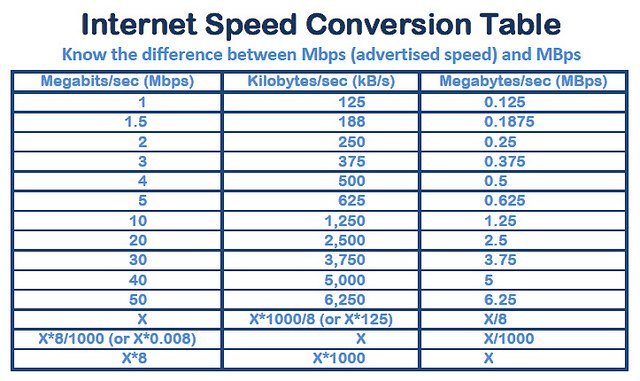
This is one of the most commonly misunderstood abbreviations. A Mbps refers to megabits per second (not megabytes). A megabit does not equal a megabyte. It actually takes eight bits to equal one byte, so if you’re downloading a one MB (megabyte) file at one Mbps (megabit per second, it will take eight seconds to download. The same goes for Gbps – that’s a gigabit per second, or one-eighth of a gigabyte.
Bandwidth
Imagine a highway. Bandwidth is the width of the highway, determining how many cars can fit onto it at once, or the maximum number of megabits you can download per second. You don’t buy speed from your ISP – you buy bandwidth.
Throughput
Throughput is how many cars are actually on the highway. It can never be greater than the bandwidth you have available.
Speed
Finally, “speed” is a fairly subjective combination of a lot of different factors that determine how fast you actually receive data. Trying to run too much data through limited bandwidth can impact the perceived speed, but so can distance, DNS servers, hardware, etc.
How much bandwidth do different activities use?

Trying to jam more traffic onto a highway than it’s built for can cause a traffic jam, and Internet bandwidth is the same way. If you want everything you’re requesting to actually make it to your screen, you’ll need to make sure that your network has enough bandwidth to accommodate the extra load.
As a general rule for 2018 (though your mileage may vary!), anything below two or three Mbps can feel slow if you’re doing much more than everyday browsing, and anything above fifty Mbps won’t be noticeably faster unless you have a few people and a few devices online simultaneously.
Streaming video: 3-25 Mbps

This is probably the biggest bandwidth hog that people use on a regular basis, so it’s a good place to start. This data from Netflix and YouTube provides a good reference point:
| Video type | Bandwidth (in Mbps) |
|---|---|
| YouTube (low quality – 360p) | 0.7 |
| YouTube (720p) | 2.5 |
| Netflix (standard quality – 480p) | 3 |
| Netflix (HD quality – 1080p) | 5 |
| Netflix (ultra HD quality/4K – 3840p/4096p) | 25 |
As long as you’re not doing much else on your network, 0.5 Mbps can get you some grainy YouTube and twenty-five can get you 4K. Anything above five should generally get you a buffering-free video experience, subject to other network conditions, of course.
Online gaming: 1-6 Mbps

It’s a common misconception that multiplayer games use a lot of bandwidth. They’re not constantly sending video back and forth, though – just a few pieces of data representing things that change about the game. Everything else is rendered locally. It depends on the game, but you shouldn’t generally need more than a few megabits download/upload. You should probably pay more attention to your ping, as latency is the real problem in online gaming.
Video calling: 0.3 – 8 Mbps

If you work from home or just like using video chat, you’ll definitely be using up some bandwidth – but maybe not as much as you think. You can have a pretty low-quality Skype conversation at 0.3 Mbps down/up and a great one at 1.5 Mbps down/up. However, the more participants are involved in the call, the more download bandwidth you’ll need to receive all their streams.
General browsing, social media, and email: 1-3 Mbps

Unless your browsing routine is especially photo or file-heavy, one to three Mbps will deliver most HTML, text, and image content to you about as fast as you could want.
Multiply by the number of users and devices
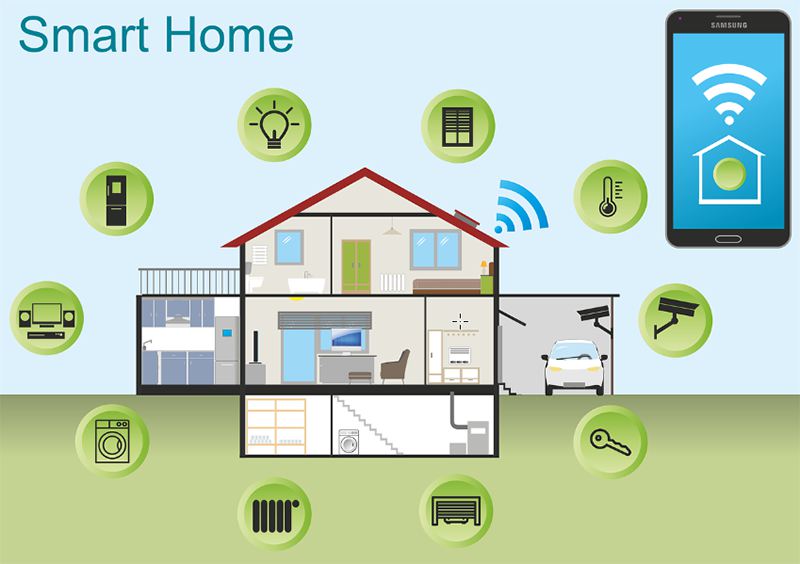
One person with a streaming video habit and two or three connected devices can probably get by with ten Mbps. As you add people and devices to the mix, though, you’ll need at least a few extra Mbps per internet user, especially if they tend to be on simultaneously or if they have some heavyweight media/work needs. Smart home devices and internet-of-things devices may also be taking up a bunch of background data.
To gig or not to gig?
From a practical standpoint, a digitally-savvy family in 2018 will probably be fine with a thirty Mbps connection. Springing for more than the minimum isn’t necessarily a waste, though: it can help keep your Internet humming along through congestion and peak times and can come in handy for times when you need to download big files or put extra strain on your network.
Of course, it’s also perfectly valid to get super-fast Internet because it’s cool, it feels like the future, and you want to run speed tests when your friends are over. And also when your friends aren’t over. Just one more test… what? No, we don’t have a problem. Seriously though, as a home user, unless big numbers are important to you or you use a lot of bandwidth, you may not notice the difference between thirty and three-hundred Mbps, much less between one-hundred and one-thousand.
Image credit: Internet Speed Conversion Table, Best Of 2016 – Multiplayer Game, Girl is browsing Pinterest on her MacBook Air, Internet Speed