

There’s no denying change is hard. While it can be exciting to change things up sometimes, no one wants to be forced into making changes, especially when it comes to productivity. Earlier this year, Google introduced a new Gmail design and allowed users the option of going back to the original. That will no longer be the case, as Gmail users will be forced into only using the new Gmail design and will no longer be able to revert back to the original Gmail Design.
Tip: learn how to use Google Tasks effectively in Gmail.
Initial Gmail Design Change
Again, change is hard, and Google has a history of messing with Gmail. It received a lot of flak when it eliminated the Inbox app. Many users grew to love it, only to have it pulled away from them when Google took it off the shelf. It turns out Google was only using it to experiment with new features, some of which were rolled out into the Gmail app.
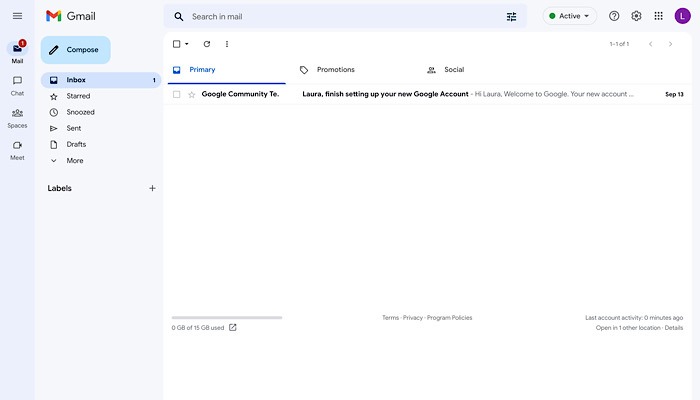
This time Google is making changes to the Gmail web app. In February, a change was instituted that offered other Workspace options, including Chat, Spaces, and Meet in an additional sidebar on the left. It still worked the same – it just looked different and had additional options.
Google said in a recent Workspaces update that by offering Chat, Spaces, and Meet along with Gmail, it made it “easier to stay on top of what’s important and reduces the need to switch between various applications, windows or tabs.” That’s fair.
Things began to change over the summer. While the new design was once an option, the original Gmail design was now the option. You were automatically set up in the new Gmail design unless you opted out of it.
Doing Away With the Original Gmail Design
Users who really liked the original Gmail design will soon be out of luck, if they aren’t already. There will no longer be an option to keep it, and users will be forced to use the new Gmail design.
However, there are other options. You won’t be able to bring back the original Gmail design, but you will be able to get rid of the sidebar on the left, though you won’t find “left sidebar” in the settings options.
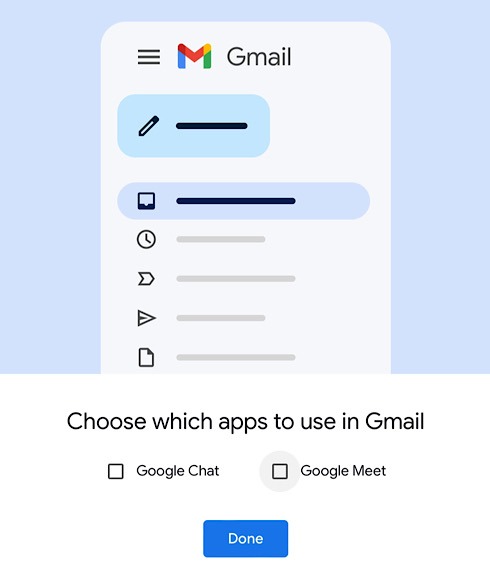
To eliminate the sidebar and get closer to what you were used to, you can go into the Settings menu and select “Customize” under “Chat and Meet.” Uncheck the boxes for each one, and the left sidebar will be gone when you return to Gmail.
Do note, though, that if you like to chat with your coworkers, by eliminating the option in the sidebar, you won’t have any other options: Chat will no longer be offered on the right side. Once again, this isn’t the best option but is the only option.
This change will be available to “Google Workspace Business Starter, Business Standard, Business Plus, Enterprise Essentials, Enterprise Standard, Enterprise Plus, Education Fundamentals, Education Plus, Frontline, and Nonprofits, as well as legacy G Suite Basic and Business customers.” Google Workspace Essentials customers will not be offered this change.
This new Gmail design will be in effect in two separate rollouts. One gradual rollout started on November 8 and is expected to take up to 15 days. The other will start on November 29 and is expected to take up to another 15 days.
Are you looking to use Gmail in an app? Check out this option to create a Gmail app using the Offline option.
Image credit: Unsplash. All screenshots by Laura Tucker.