

Microsoft introduced the new vertical tabs feature for its Edge browser recently. It provides a clean and minimal way of stacking all the tabs to the side of the Edge browser. This keeps the top of the browser clean from the long list of tabs we traditionally have. Personally, it looks pretty neat and refreshing. But switching over to a new browser does not make sense just for the sake of vertical tabs. Thankfully, there are workarounds by way of extensions that will help you get the vertical tabs in other browsers. Here we show you a few extensions to get vertical tabs on Chrome and Firefox.
Get Vertical Tabs in Chrome
For Chrome, there is no shortage of vertical tabs extensions in the Chrome store. However, most of them have a bad UI. Below is one of the best vertical tabs extensions available for Google Chrome.
Vertical Tabs by Michael
Vertical Tabs can get you the experience of vertical tabs like the Microsoft Edge browser. It is also one of the highly-rated vertical tabs extensions in the Chrome Web Store.
This extension provides some extra nifty features, like adjusting the sidebar position, squeezing the webpage, tab title, dark mode, etc.

Moreover, the Vertical Tabs extension has a pretty minimal and simple user interface, and the actions are actually faster compared to other extensions in the Chrome Web Store.
As for the downsides to this extension, firstly, it does not work in Chrome pages such as the new tab, settings, history, and the Chrome Web Store. Secondly, and probably the most annoying, you have to enable this extension every time you minimize it.
Get Vertical Tabs in Firefox
For Firefox, there are actually a couple of extensions you can use to get vertical tabs.
1. Tree Style Tab
Tree Style Tab provides a different take on the vertical tabs feature. It allows you to set a parent tab and set its different child tabs. You will end up having vertical tabs in the form of a tree. You can create a hierarchy of tabs for easy navigation.
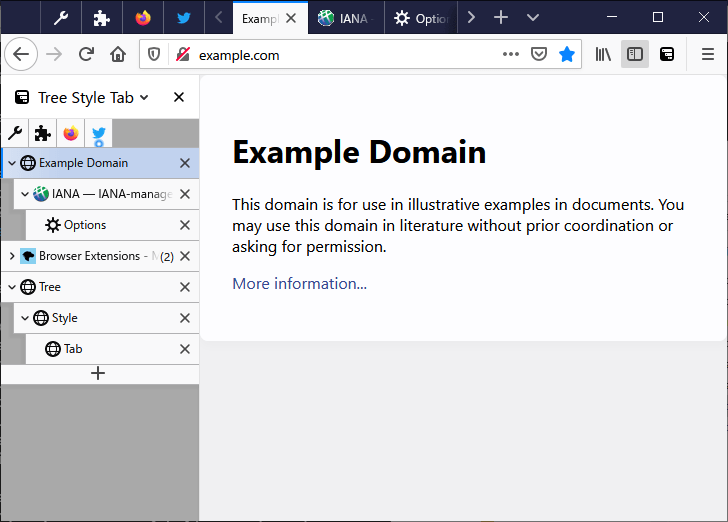
If you open a new tab from a currently opened tab, then it is automatically organized as a “child” tab in the tab tree. Users can easily expand or collapse the tabs by clicking the downward/upward triangle button in the “parent” tab.
There is only one con that I could find with this extension: the tree view of tabs can get a bit congested. Other than that, there is nothing not to like about it.
2. Tab Center Reborn
The second Firefox vertical tabs extension that I find useful is Tab Center Reborn. As the name suggests, it actually refreshes the tab menu for Firefox and takes vertical tabs to the next level. It not only shows you the tabs in vertical format but also shows you the webpage’s thumbnail.
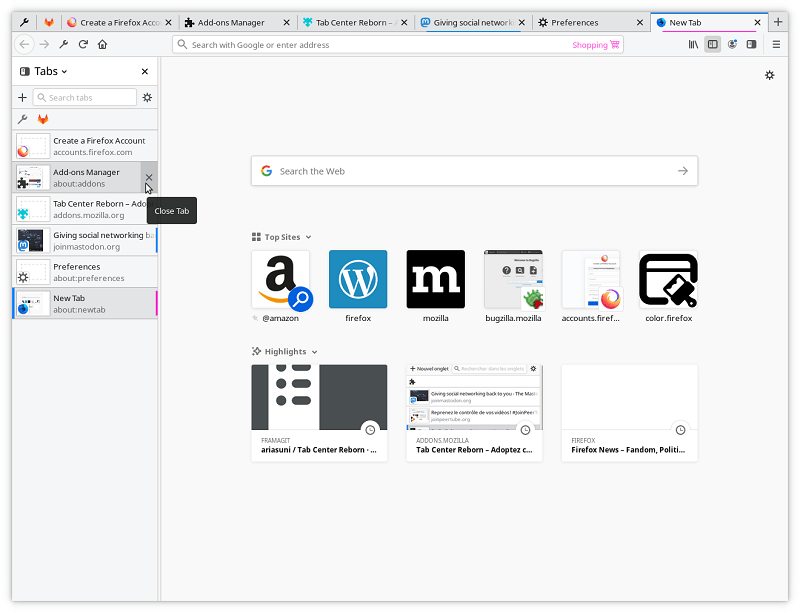
This enables the user to quickly navigate within multiple tabs by taking a glance at the thumbnail. Tab Center Reborn for Firefox also blends in with your browser theme. I did not come across any issues with this extension, and it is a worthy replica of the vertical tabs you would get with the Microsoft Edge browser.
Wrapping Up
Frankly, if you really want to use the vertical tabs feature but not on Microsoft Edge, I would recommend using it on Mozilla Firefox. The vertical tabs extensions for Firefox are more polished and provide more options. Don’t forget to also check out these Firefox addons to protect your privacy.