

The White Screen of Death is one of the most horrifying errors that can happen in WordPress. While it certainly isn’t pleasant to get a White Screen of Death, in most cases this isn’t a disastrous problem – if you know how to deal with it, of course. In this article I will tell you about the reasons why a White Screen of Death happens in WordPress and how to fix the most common of them.
What is the “White Screen of Death”?
White Screen of Death, as its name implies, is when the frontend of your WordPress site is showing nothing but a white screen. This happens when there is some internal errors in your server, and it can’t render the content to display on the screen. For a development site, there will be error messages on the screen to show you where the server went wrong, but for a live site, the error messages are usually hidden, thus resulting in a blank white screen.
1. An Incompatible Plugin or Theme
An incompatible plugin or theme is the most common reason why you see this nasty white screen. Fortunately, it’s also the easiest to fix.
If you are lucky, chances are you will be able to access the admin dashboard (http://yourdomain.com/wp-admin, unless you have changed the login URL). Log in and disable the incompatible plugin/theme.
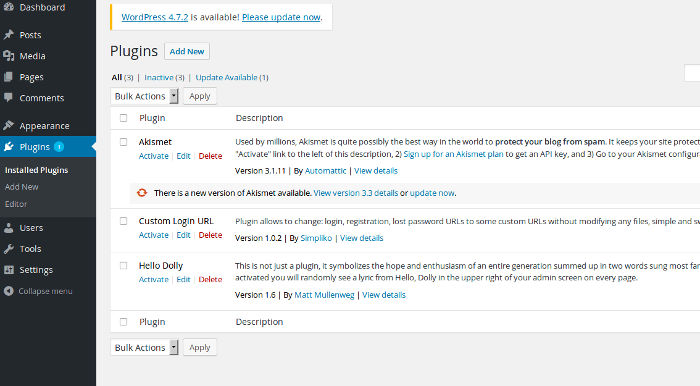
If you are getting a white screen on the admin pages, too, you will need to make the changes via FTP. Connect to your site with an FTP client, and go to the “wp_content -> plugins” directory, if the suspect is a plugin, or the “wp_content -> themes” directory, if you suspect a theme is causing the problem. Don’t delete the plugin/theme – just rename it to disable it.
Now check if this fixed the problem. If it did, get rid of the plugin/theme for good. If it didn’t, try with a different plugin/theme, if you suspect one of them are the reason, or read further for other possible reasons.
2. Failed Auto-update
It’s great to have your WP, themes, and plugins updated at all times and all this without any manual labor on your side, but an undesired site effect of automation might be a broken WP site. The new versions of a plugin or theme might not be compatible with the rest, and this could be causing the issue.
If you are seeing the White Screen of Death after an auto-update, your only chance is to restore the pre-update configuration from a backup and disable auto-updates. If you don’t have a pre-update backup or any other recent backup, this is disaster, and you might have to disable all the plugins one by one to find which of them is causing the problem.
3. Database and WP Configuration Issues
Database and WP configuration issues are not as common as plugin/themes as reasons for the White Screen of Death, but they can be the cause. These problems don’t happen without a reason – it’s usually because you or somebody else has messed with the database or the configuration files. Get rid of the changes you made and hope it will work. As with auto-updates, a recent backup of the database/configuration files is your saver.
In very rare cases, the database itself might be corrupted, but this typically leads to more drama than just a White Screen of Death, and you will certainly notice if the database is not okay. A corrupted database is pretty serious, and you might have to call a WP guru to save you.
4. Hosting Issues
Sometimes your hosting can lead to a White Screen of Death. This usually happens on shared servers where many sites struggle for resources. Try to add:
define( 'WP_MEMORY_LIMIT', '64M' );
to your “wp-config.php” file to increase your memory limit to 64MB. As a last resort, consider switching to a more generous plan or to another hosting provider.
5. Your Site Might Have Been Hacked
Hackers are one more reason for a White Screen of Death. Fortunately, it isn’t a very common one, at least in comparison to plugins/themes. There isn’t a universal prescription for fixing a hacked site because it all depends on what damage has been done.

The White Screen of Death isn’t as horrifying as is looks, but it still isn’t nice. The worst is if you haven’t checked your site for some time because in this case you have no idea how long the white screen has been on. More often than not the reason for a white screen is a plugin/theme, which is one more reason to be very careful of what you install on your site.