

Have you ever encountered this problem? You’re working online using Google Chrome, when suddenly a page that you need pops up an error message saying the (Flash) plugin cannot be loaded. Or worse still, your Flash player crashes. Do you look for another page? That may work in the short term, but you may still have the underlying problem with the plugin. It can come back to inconvenience you again. Instead, it’s better to resolve plugin errors now.

Plugins help render web pages or provide specific functionalities on the page. For example, the Flash plugin helps load web pages with videos or other flash content. When Flash is not working correctly, there are a bunch of problems you can encounter.
Flash may be declining in popularity, but if you need it and it’s not working, here are some steps you can take to resolve plugin errors with Chrome in Windows 10. If one of these fixes doesn’t work, move on and try the next.
Rename pepflashplayer.dll
The file “pepflashplayer.dll” can sometimes cause a problem with Flash content. The first step you should try in resolving the issue is to rename this file.
1. Find the file by first accessing the run dialog by pressing Win + R.
2. In that box type %localappdata% and press Enter. This will take you to “appdata -> local.”
3. Click on the Google folder, then follow the path “Chrome -> User data -> Pepperflash -> another numbered folder.”
4. Inside that numbered folder, locate “pepflashplayer.dll,” and rename it to “pepflashplayerX.dll.”
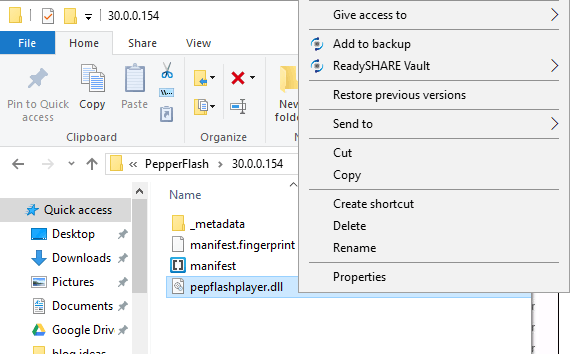
5. Exit the browser, then reopen it and try to load the page again.
If this solution doesn’t work, try this next solution.
Use Command Prompt
Sometimes corrupt files on a Windows 10 computer can cause errors in plugins. To fix these errors, use the command prompt to enter two commands which will scan the system and repair any corrupt files.
1. Press Win + X or right-click on the Windows button in the bottom-left corner.
2. Choose Command Prompt (admin) from the list of options.
3. When Command Prompt opens, type sfc /scannow and then Enter.
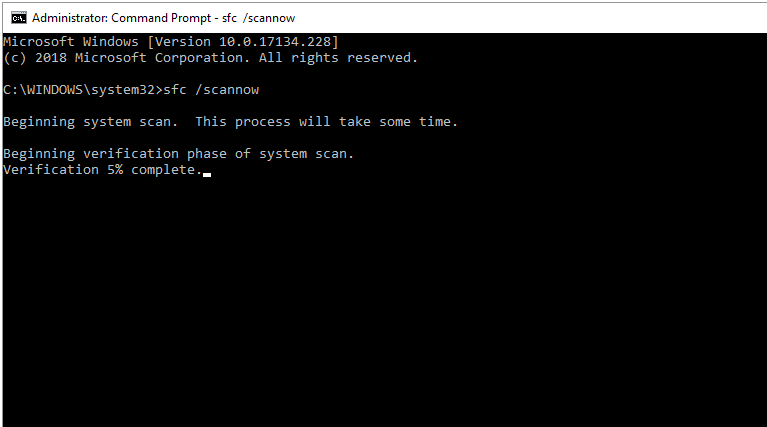
4. The computer will run a scan and fix any corrupted files.
If that command doesn’t run, you can try typing
DISM /Online /Cleanup-Image /RestoreHealth
into the command prompt.
After trying one or both of the above commands, relaunch your Chrome browser and see if the error message on that page has disappeared.
Is the error message still there? The following is a different option.
Delete the PepperFlash Folder
1. To delete PepperFlash, first exit out of your browser.
2. Open the folder containing PepperFlash found in step one.
3. Right-click on the folder and delete it.
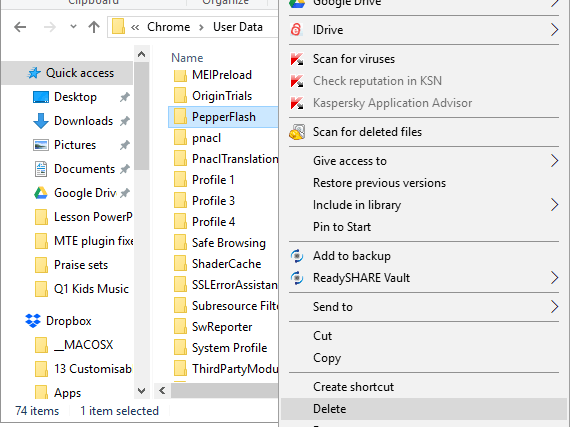
4. Open the page again to see if the issue is resolved.
Since Flash is not as prevalent as it once was, Chrome has severely limited your options in the settings for dealing with issues. There is no longer an easy way to allow the plugin to run all the time, which would have once solved the problem. If you still need Flash to run, give the three tricks listed above a chance.