


With the release of Firefox 55, Mozilla added a new privacy feature, called First-Party Isolation, that safeguards users from cross-site tracking. Once you turn on FPI, ad trackers can’t trace your web activity or see all the cookies dropped to your system. Here’s how you can enable First-Party Isolation in Firefox.
What Is First-Party Isolation?
In short, First-Party Isolation (FPI) restricts access to cookies, the cache, and similar data to domain level only. This means that when you enable FPI, advertising agencies can’t use cookies to track your Internet activity as you browse the Web.
If you’re not familiar with them, cookies are small data packages that your computer stores in your web browser. When you access a website, it may “drop” or send a cookie to your computer. Your browser uses cookies for things like keeping track of website preferences, search results, and items in your shopping cart. But the main function of cookies is to help websites keep track of site visits and activity.

Usually, marketing companies drop cookies via ads on a website which enables them to track your activities across all platforms that run their ads. First-Party Isolation disrupts this practice by preventing anything but the site that originally dropped the cookie from accessing that data. Once you enable FPI, ad trackers can’t trace your web activity or see all the cookies dropped to your system. This prevents marketing companies from building profiles based on what you do on the Web.
While Firefox is the first major web browser to offer this as a privacy setting, it isn’t the first to use FPI. In fact, FPI functionality is one of several features that Mozilla has borrowed from the Tor Browser (where it’s called Cross-Origin Identifier Unlinkability).
Even if you’ve never used the Tor Browser, you’ve probably heard of it in reference to the so-called “deep” or “dark” Web. The Tor Browser, which is based on Firefox, uses a network of relays and various levels of encryption to hide your IP address and online activity from traffic analysis and surveillance entities. Mozilla added FPI to Firefox as a part of the Tor Uplift Project, which aims to improve the browser’s privacy and security settings.
Also read: 26 Firefox Quantum About:Config Tricks You Need to Learn
How to Enable First Party Isolation on Firefox
Enabling FPI can cause problems when you try to access sites that use cookie-based authentication, so it’s turned off in your browser by default.
1. To turn on FPI, type about:config in the URL address bar and press Enter.
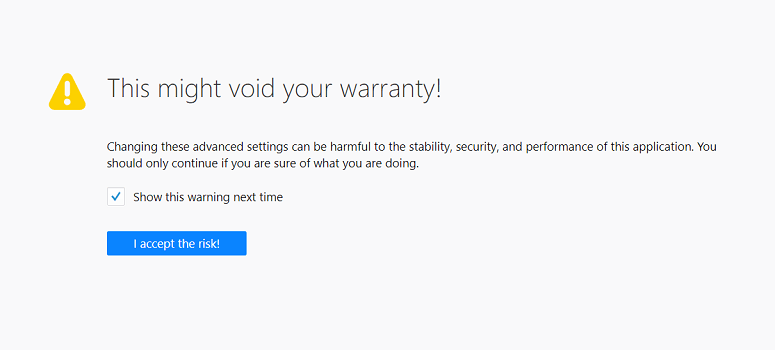
2. Since making arbitrary adjustments to the “about:config” settings page can potentially break Firefox, you may see a warning notifying you of the risks. If you want to proceed anyway, click “I accept the risk!”
3. Search for “firstparty” and double-click privacy.firstparty.isolate to change the value from “false” to “true.”
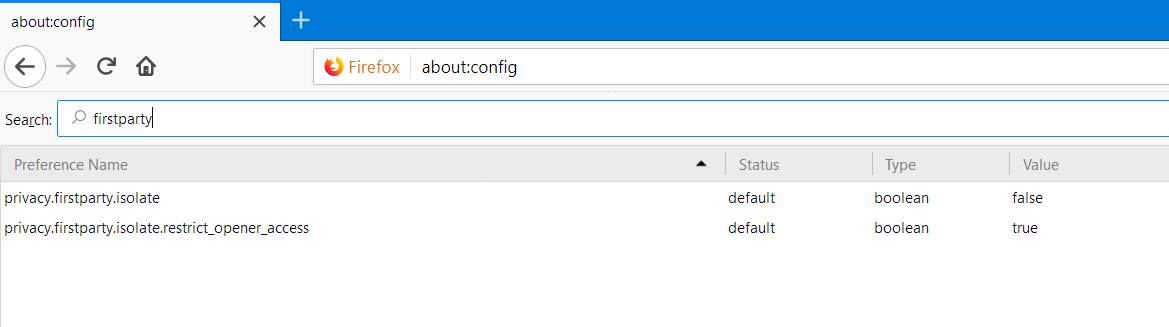
When you want to turn off FPI, just navigate back to privacy.firstparty.isolate and change the value from “true” to “false.”
Conclusion
First-Party Isolation seems like it’ll be a permanent feature in Firefox, but few people are aware of it. Mozilla doesn’t exactly recommend messing around in about:config (hence the full-page warning), so they didn’t go out of their way to advertise the new feature and even left it out of the official Firefox 55 release notes.
If you’re not keen on modifying your about: config settings but want to try FPI, there’s an add-on called “First-Party Isolation” that lets you use the new feature without the risk. Once you enable the add-on, you can turn FPI on or off by just clicking the extension’s icon.