


Did you know that your Wi-Fi signal has a channel? With so many Wi-Fi devices dominating our lives, from full-blown computers to the Internet of Things, the communications can get pretty crowded.
In order to ensure devices have as little conflict with each other as possible, channels are used to separate devices from one another and to achieve a better signal connection. Of course, the more devices you have, the more these channels get crowded, and your Wi-Fi quality suffers as a result. As such, it’s a good idea to check your Wi-Fi channels to see what’s going on.
How Do Channels Work?
When picking a channel, it’s crucial to know if you’re using a 5GHz or 2.4GHz band. If you’re using 5GHz, you can simply look for channels that aren’t being used. There’s quite a lot of them, so take your pick!
If you’re using 2.4GHz, you only have eleven channels, and the one you pick will overlap with the channels that are two above and below it. For example, if you put a computer on channel 3, the channel will overlap channels 1 through 5. This can easily make for a crowded Wi-Fi space, even if each device has its own channel.
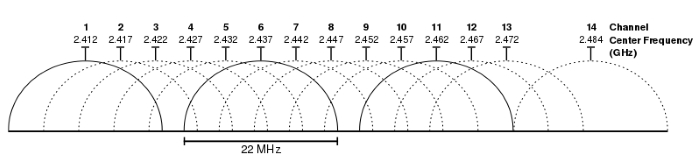
The best way to tackle this problem is to pick channels that don’t overlap with one another. There’s a very easy way to achieve this – simply ensure all your devices are on channels 1, 6, or 11, and they naturally won’t overlap with one another. This makes it easier to keep the airways clear.
Finding a Channel
The majority of the time devices are programmed to automatically find the best channels and swap to them to keep noise down. However, in the tech world “automatic” comes in two forms: perfect, and so flawed you’re better off doing it manually!
If you want to see what channels are currently being occupied, you can do so using inSSIDer for Windows and Mac (Linux users can check out LinSSID). The Lite version is free, but requires an account to be created before use. Once you have everything installed and set up, you can open up inSSIDer and check all the wireless networks in your vicinity. You can even see the channels at the bottom and where the overlap lies!
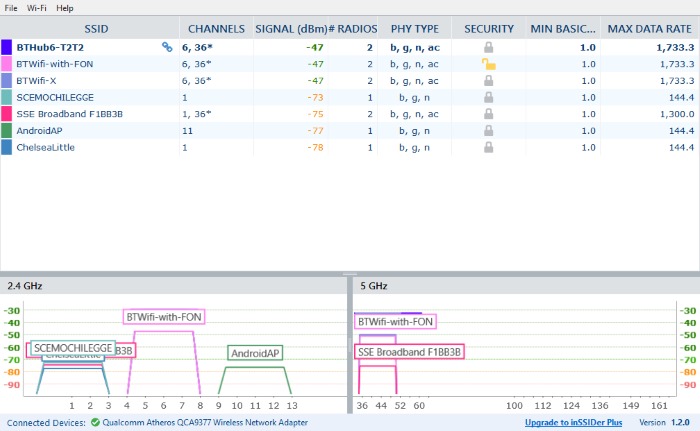
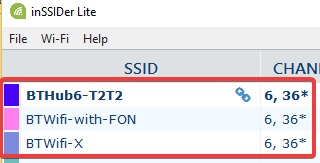
Be careful if you have a router that also doubles as a hotspot for fellow broadband customers. InSSIDer will see your personal SSID and the hotspot SSID/s on the same channel and report congestion. Here, my personal router is BTHub6-T2T2, but BT users can also connect to it using “BtWiFi-with-FON” and “BTWifi-X.” InSSIDer gives the impression that three routers are on this channel, when in fact it’s just one router reporting three times!
If you want to change the Wi-Fi channel, you can do so via your router. Unfortunately, every model of router does it their own way, so you’ll have to read up in your router’s manual on how to change it with your specific model. It will likely involve logging onto your router via your browser and changing a setting that way, so have a poke around if you can’t remember where you left the manual!
Channel Surfing
If you’re struggling to get a solid Wi-Fi signal, changing the channel may be the best way to solve this problem. While routers typically automatically set their channels, you can check to see if it’s doing a good job and swap to a less crowded area should you need to.
Did this improve your Wi-Fi signal? Let us know below.
Also read: How to Find and Share Your Wi-Fi Password Easily on Any Device
Image Credit: Michael Gauthier, Wireless Networking in the Developing World