


Changing your DNS server is a good idea. You will get better security, privacy, accuracy, and speed by switching away from your ISP’s default. You can change your DNS by just entering a few numbers into your computer or router, but figuring out what those numbers can be is a little more confusing. Google and OpenDNS, the popular choices, may not actually be the best, but luckily, they are far from the only options.
Also read: Changing Your DNS Server: Why You Should and How to Do It
What makes a good DNS server?
1. Security
Most ISPs do not use any DNS security, so finding a provider that uses DNScrypt (Very good but requires some setup), DNSSEC (Good but not encrypted), or DNS-over-TLS/DNS-over-HTTPS (Very good but rare) is preferable. Services that use one of these protocols will usually list it in their FAQ or technical information.
2. Privacy
Your ISP probably records your DNS requests, but many alternatives do as well. Try to find a service with anonymous logs (good, fairly common) or no logs (best but hard to find). If the provider doesn’t list their logging policy, just do a search for “[DNS Provider] logging policy.”
3. Accuracy/scope
Most public DNS servers keep more up-to-date records than ISPs, though this is hard to test. Even better, though, some provide access to domains that aren’t even listed on most servers, like “.ti,” which is not an official domain since Tibet is technically part of China.
4. Speed
When it comes to milliseconds, geography matters – the farther your server, the slower the speed. Using a Danish server while you’re in Chile will likely have a noticeable impact on your speed.
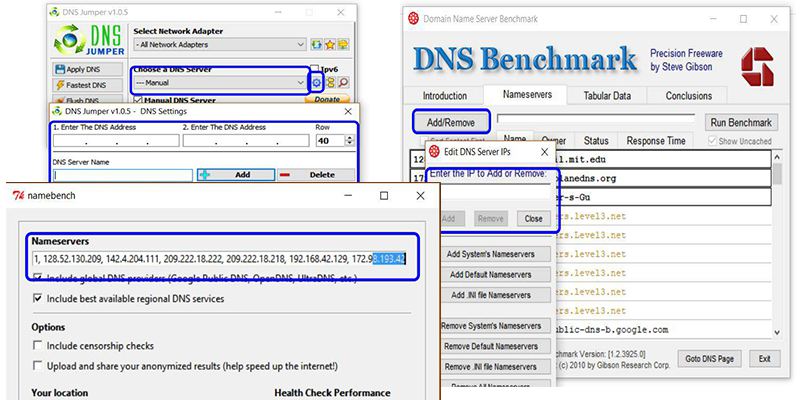
Before you settle on a server, test its speeds using a tool like DNS Jumper, DNS Benchmark, or NameBench. If the service you’re testing isn’t listed, all of these tools have fields where you can enter custom DNS addresses. Plug them in, test them, and pick the best ones relative to the others.
Option 1: Big Data

1. Google Public DNS (8.8.8.8, 8.8.4.4): Fast, reliable, secure, but potentially not private
Pros:
- User-friendly
- Great security (DNSSEC and DNS-over-HTTPS)
- Worldwide reach means top-notch speeds
- Claims to delete logs within forty-eight hours
Cons
- Even if they claim their DNS is private, the fact remains that Google’s business model is making money off your traffic.
2. OpenDNS (208.67.222.222, 208.67.220.220): Fast, customizable, and very secure, but definitely not private
Pros
- Well-maintained servers and good speeds
- Top-notch security (DNSCrypt) and browsing protection
- Content-blocking and other settings available
Cons
- OpenDNS claims not to sell your logs, but they explicitly state that they keep everything
- They may be censoring some legitimate websites
- They are owned by Cisco, an IT giant that, again, is getting all your information
3. Others – Level3 Communications – big, reliable, not private, no notable security features
Option 2: Maximum Privacy

1. OpenNIC: Wide variety of servers with good security/privacy
Pros
- Good reputation for privacy and reliability
- Many servers have no-logging policies and/or DNSCrypt
- Servers all over the world, so speeds are generally good
Cons
- Standards can vary widely between servers
- Requires some trust in server-operators
- Requires some tech knowledge
2. DNS.Watch (84.200.69.80, 84.200.70.40): High privacy, good security, varying speeds
Pros
- Great reputation for privacy, no logging
- Reliable
- Good security (DNSSEC)
Cons
- Based in Germany, so speeds are best in Europe
3. Others
- FreeDNS: Great privacy, no extra security, varying speeds
- UncensoredDNS: Great privacy, uses DNSSEC, but gets slower as your distance from Denmark increases
Option 3: The Middle Ground

1. Quad9 (9.9.9.9, 149.112.112.112): Great security, privacy guarantee, good speeds
Pros
- Rolled out in 2017 by IBM, so it’s fast and being continuously upgraded
- Great security (DNSSEC) and a continuously-updated list of blocked malicious websites
- They claim not to store any personally identifiable information and are non-profit
Cons
- IBM is still a big corporation that might use your data
- Auto-blocking malicious websites is nice but may lead to some accidental censorship
2. Verisign (64.6.64.6, 64.6.65.6): Unspecified security, vague privacy, good speeds
Pros
- Trusted company with plenty of servers
- Promises not to sell your data
Cons
- Only promises not to sell your data; is probably still logging it
- A little light on security specifications
3. Others
- Comodo: well-known security company, good speeds, automatically blocks malicious sites, but no extra security and probably keeps logs
- Norton ConnectSafe: another security company, unspecified privacy, can be set to block malicious sites/adult content
Conclusion: Which Is the Best?
The DNS servers listed here represent a significant chunk of the market, though there are others that may also work for your needs. Your best options will vary, but in general, OpenNIC has something for everyone, with Quad9 being a more user-friendly backup option.
Once you change your DNS, don’t forget to check and make sure it worked!