

Are you unable to retain formatting from Google Docs? Google Documents is one of Google’s most popular products and is the springboard from which they launched other Google office applications and Google Drive. Despite this, Docs has a history of being difficult about formatting. Let’s explore the issue a bit.
Also read: How to Add a Written Signature to Google Docs
The Problem
Google Documents is a cloud-based word processor. While it’s capable of exporting its documents in all kinds of popular formats for text-based documents, such as Word’s .docx or Libre/OpenOffice’s .odt, these exports often result in broken line spacing and image placement and other issues. In order to retain formatting from Google Docs Internet users all over have discovered a few methods that seem to help preserve their page layout.
Solution 1: Print to PDF (In Chrome)
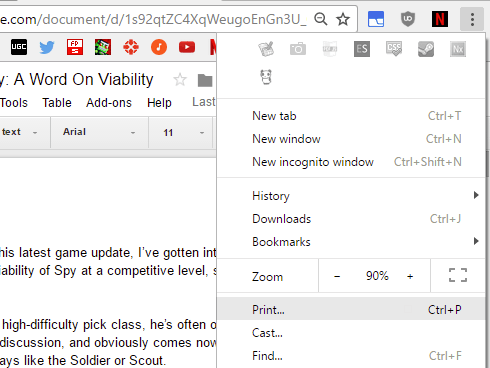
First, open your Google Document in Chrome. Once you do that, click your Chrome options button, then select “Print” in the dropdown menu as highlighted in the screen above.
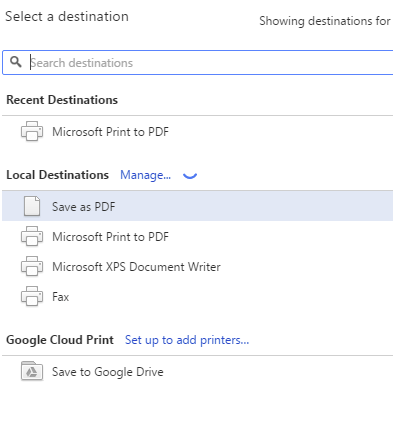
Once you do that you’ll get an option to print the document or to save it as a PDF. For the purposes of this guide you’re going to want to save it as a PDF.
Pros
- The most reliable format preservation
- The resulting PDF file can later be printed with the layout exactly as it should be.
Cons
- Code-style formatting breaks in seemingly all Docs exports. Don’t write your code in Google Docs!
- Requires you to use Google Chrome
Solution 2: Export to PDF (In Docs)
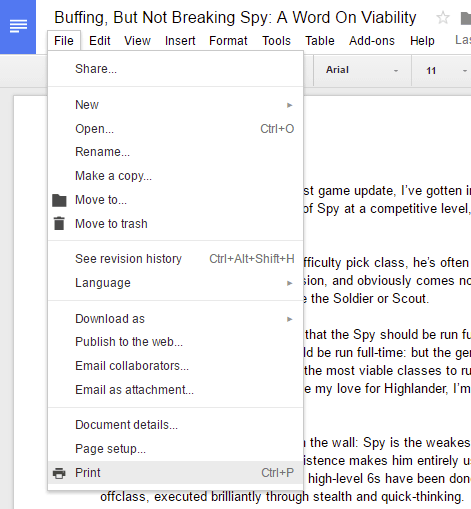
Alternatively to using Google Chrome, you can also use the Google Docs page itself. Start by selecting File and then Print. The following screen should look pretty familiar if you read the previous part of this guide.
Once more the instructions stay the same. Save as a PDF to preserve most formatting. Character spacing and font sizes are known to change slightly during the export process in addition to extra lines within paragraphs.
Pros
- Doesn’t require you to use Chrome
- Is easily accessible from any desktop browser
Cons
- Won’t preserve formatting perfectly
- Like the other forms of exporting, code will break if exported from a Google Doc. Never do code in a word processor!
Solution 3: Google Docs Publisher

Finally, there’s Google Docs Publisher. Using this one is pretty simple in comparison to other entries on this list, and since it provides its results in a web page, Publisher makes this solution ideal for maintaining formatting for content going online.
Using it is as simple as clicking “Publish” in your original Google Document and copying the following link over to the text box on its main page.
Pros
- Great ease of use
- Allows easy conversion of Google Documents to web formatting
Cons
- Still breaks code
Conclusion
And that’s it! These are the main ways we could find to export and retain formatting from Google Docs. What about you? Do you do regular work in Google Docs that needs to be exported to different file types or printed/published without layout issues?
Let us know about your own experiences with this below!