


Base64 is a popular binary to ASCII encoding scheme designed to reliably transfer binary data across channels that have limited support for various content types. This article goes over the basics of Base64 encoding, how it works and details different command line and graphical ways to encode your own data using Base64.
[mte_toc]Also read: How to Find Large Files in Linux
What Is Base64 Encoding
Base64 is an encoding technique, which converts binary data, such as images and video, into ASCII format (an encoding scheme for representing text data in a computer systems.). Since binary data consists of strings of 0s and 1s, Base64 encoding works by converting these characters into a definite set of ASCII. The result can be easily decoded by mapping the ASCII characters into the binary value.
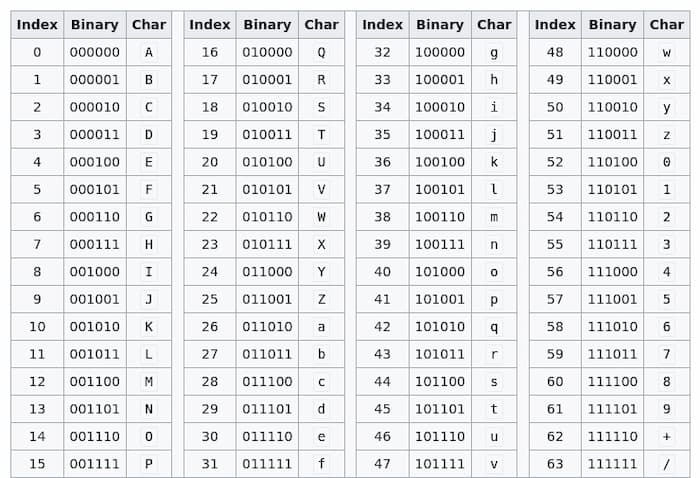
Below you can find a list of standard ASCII characters used in Base64 encoding.
- Number characters: 0-9.
- Uppercase alphabet characters: A-Z.
- Lowercase alphabet characters: a-z.
- Two special characters: “/.” and “+”.
Also read: How to Copy and Paste Text, Files and Folders in Linux Terminal
Why Is Base64 Encoding Used
When performing a file transfer online, binary data from the file is chopped into chunks which are called packets. These are then sent to the receiver using different protocols.

Here is where the problem arises. If the receiver is unable to decode the binary file format from the sender, it can lead to data loss or corruption. Therefore, it’s considered good practice to first covert the file using Base64 encoding before sending it to the user. Base64 will encode the characters into ASCII format, which the majority of machines can read. And given the wide adoption of Base64 encoding, you can basically employ Base64 encoding on any machine.
Also read: How to Use the dd Command in Linux
What Is Base64 Encoding Used For
Base64 is widely used to encode text, images, musics, videos etc that you want to transmit across the web. One of the established use cases for Base64 is email attachments. Files attached to an email are encoded using Base64 behind the scenes before they are sent off along with the email to their destination.

With Base64, encoded images can directly be added to HTML documents or in CSS files. This technique can help reduce the number of requests from clients and make your website more performant. You’ll need make sure to compress the image before encoding, though. Otherwise it will result into very big file sizes and slow down the website (alternatively, you can use webp file format to compress the image).
If you are transferring a big BLOB (Binary Large Object File) across the internet, it’s actually mandatory to encode the data using Base64. Otherwise if some network packets happen to get lost during the transfer, the data inside the file may become corrupted and your file will be no longer usable.
Another very popular but rather niche use for Base64 encoding is setting a custom iPhone charging sound. The new charging sound can be Base 64-encoded to ASCII using the Shortcuts app on Apple’s mobile devices.
Also read: How to Use Rm Command in Linux
How to Encode Data with Base64 in Javascript
To encode and decode data with Base64, you can take advantage of the two helper functions atob() and btoa() in Javascript. The name of these functions represents their utility. atob() function translates into ASCII to binary and btoa() means binary to ASCII.
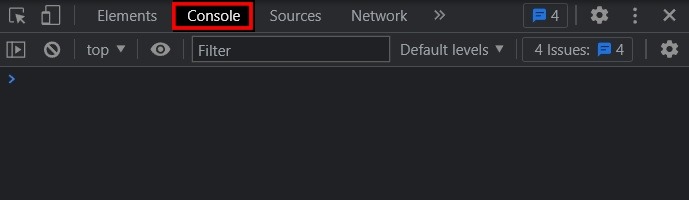
- Open the Developer console in your browser of choice. In most browsers this can be done using the Ctrl + Shift + I shortcut.
- Click on the “Console” tab. Here we can begin to write our Javascript.
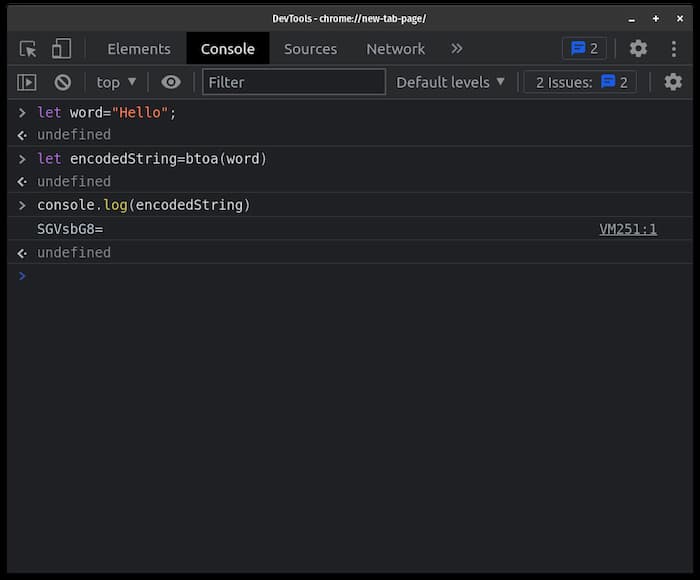
- For this example we’ll define a variable named
wordwhich contains the string “Hello”.
let word="Hello";
- Use the
btoa()function to convert this string into Base64 ASCII string.
let encodedString=btoa(word)
- Print
encodedStringto the console to see what the Base64 representation for “Hello” looks like.
console.log(encodedString)

output: SGVsbG8=
Also read: 10 Useful Python One-Liners You Must Know
How to Encode Data with Base64 in Python
In Python, you can use the built-in Base64 Python standard package.
- Import the library inside your Python file by using this command:
import base64
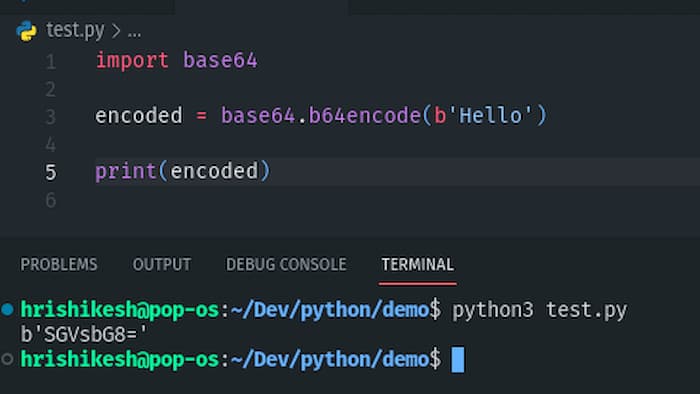
- Then use the
base64.b64encode()function to encode a string into Base64 encoded ASCII characters. We’re using “Hello'” for this example.
encoded = base64.b64encode(b'Hello')
- Now print out the result to see how “Hello” looks like in Base64 format.
print(encoded)
Also read: How to Run a Python Script on Mac
How to Encode & Decode with Base64 in Linux
Every Linux distribution comes with a Base64 encoding and decoding utility. If you are on Windows, you can use the Windows subsystem for Linux (WSL) to run the the terminal commands examined below.
With Command Line
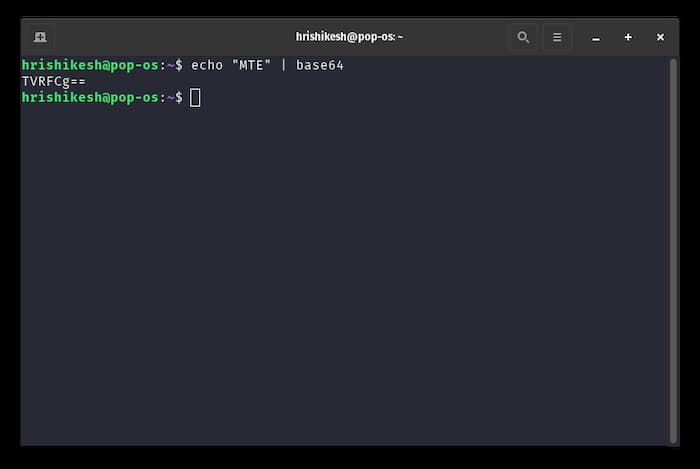
- To convert a string into Base64 encoding, at first
echothe value and pipe the output into Base64 command.
echo "MTE" | base64
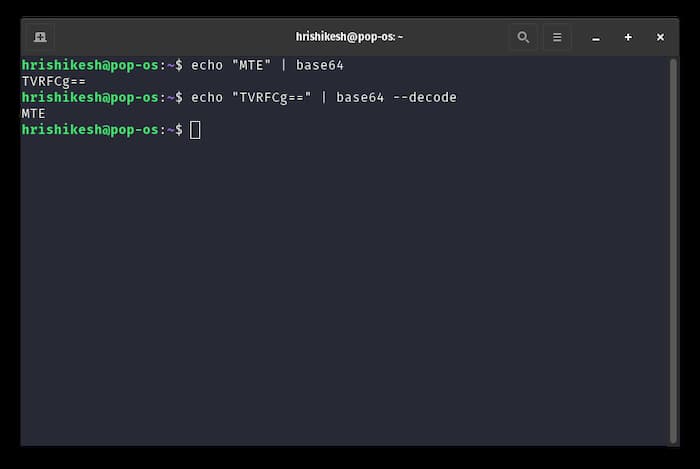
- To decode a Base64 encoded string, use
--decodeor the-dflag of the Base64 utility.
echo "TVRFCg==" | base64 --decode
- To convert an image using Base64 encoding, append the path of the image after
base64command.
base64 linux.jpg
- You can also save the output Base64 encoded ASCII strings into a file using the following command.
base64 linux.jpg > test.txt
- In the above command, we are saving the output of the “linux.jpg” image into the “text.txt” file. Now you can transfer this text files anywhere you want without issue.
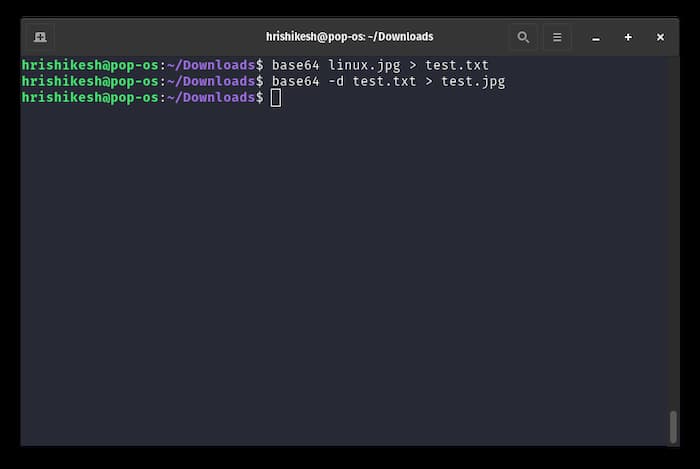
- To decode the image from the file, use the
-dflag after the Base64 command.
base64 -d test.txt > test.jpg
Using Online Base64 Converters
There are many online Base64 converters out there, but rapidtable’s Base64 converter stands out. This online tool provides a handy way to encode and decode Base64 texts and images.
To encode a text string, simply paste your string in the text area and hit the the encode button. This tool can also support text files as an input.
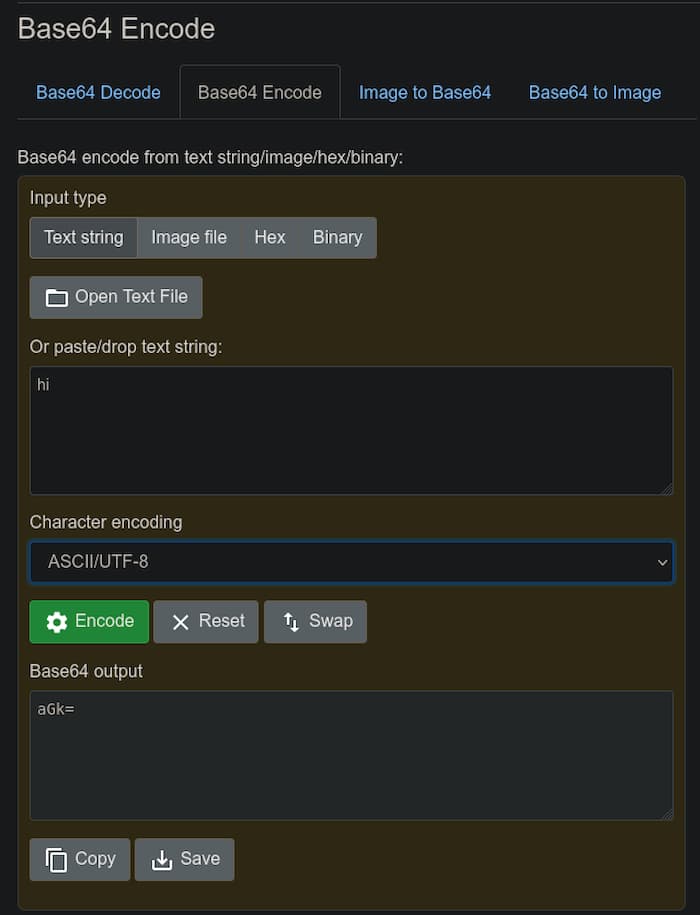
In the character encoding section, you also have additional options such as ASCII, UTF8, UTF16 etc.
Other online easy-to-use Base64 converters include:
Also read: How to Create an SSH Honeypot to Catch Hackers in Your Linux Server
Frequently Asked Questions
Why do Base64 encoded files have a larger file size then normal binary files?
Base64 encoding uses a 6-bit system, while normal binary files use a 8-bit system. 8-bit is called a byte. As Base64 encoding outputs ASCII characters which are in 8-bit and since Base64 uses a 6-bit system, 2-bits remain unoccupied for every byte of data. If you do the calculation, the Base64 encoded file is 33% larger than the original file.
Does Base64 encoding translates into encryption as well?
No. Encoding and encryption are two different things. Encoding means conversion of one format to another, while encryption means concealing information so that no one can access it without a password. Encrypted files usually have a password to decrypt the information, while encoded files can be decoded easily using the proper algorithm.
How to check if a string is Base64 encoded or not?
If the string is a combination of what appears to be a jumble of characters, then it may be Base64 encoded. To make sure, see the characters used in the string. If the characters are in the range of A-Z, a-z, 0-9, and “+”, “/.”, then this is a Base64 encoded string. To decode its value, use any of the techniques mentioned above.
Image credit: Markus Spiske via Unsplash All screenshots by Hrishikesh Pathak