


We provide a lot of personal information to companies like Google and Facebook to use their services. It’s natural to feel concerned about this. Luckily, you can easily delete your personal data from the Internet. You will need to follow different methods for deleting data from different places. We show you how to delete personal information from some of the most popular web services in this guide.
[mte_toc]How to Delete Your Google Account
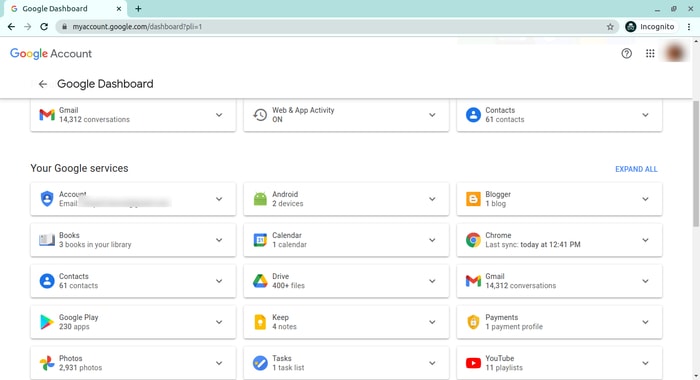
Google is arguably one of the most visited places on the Web. It stores a huge amount of data for delivering personalized content. It saves personal information, web searches, watched videos, location data, etc. You can view a summary of the data saved by different Google services by visiting your Google Dashboard.
To delete personal data from Google, go to myactivity.google.com. Select the “Delete activity by” from the left menu to start deleting activities.
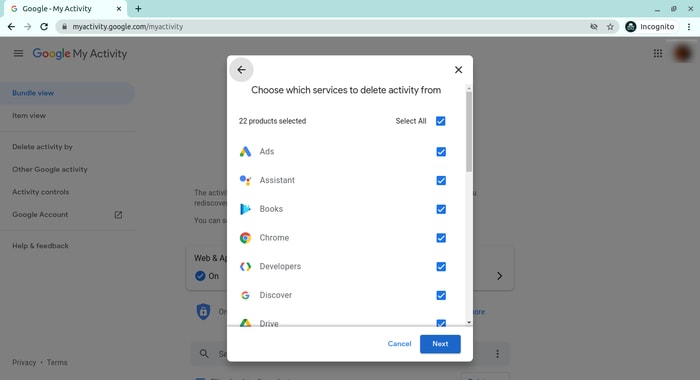
Select “All time” to delete all of your activities from different Google services. You can also delete files saved to Google services, such as Google Photos, Google Drive, and Keep. Just visit the site, select the files, and delete them.
Note that Google retains some information even after you delete all data. They do this to meet business needs and legal requirements. These will be deleted when you delete your Google account altogether.
Also read: How to Delete a Gmail Account Permanently
How to Delete Your Facebook Account
Facebook stores a huge amount of data for each user. Some of the personal information stored in Facebook’s databases includes name and email, check-ins, location, images, videos, events, etc. You can view and download all of your personal data using Facebook’s information download tool. However, you will need to delete your account altogether for removing your personal data from Facebook.
Follow the below steps to delete your Facebook account.
1. Log in to your Facebook account and go to “Settings & privacy -> Setttings.”
2. Select “Your Facebook Information.”
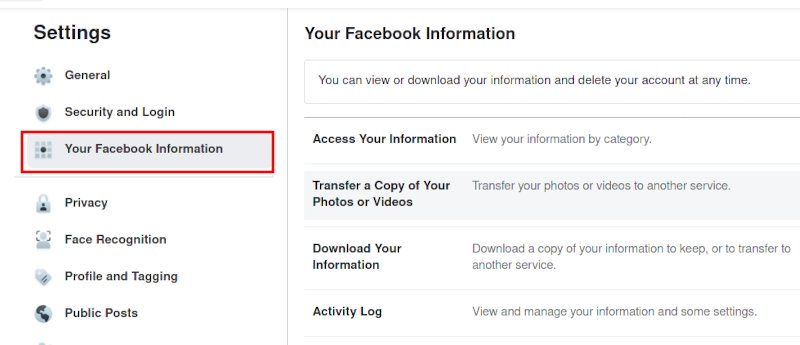
3. Select “Deactivation and Deletion.”
4. Select “Delete Account.”
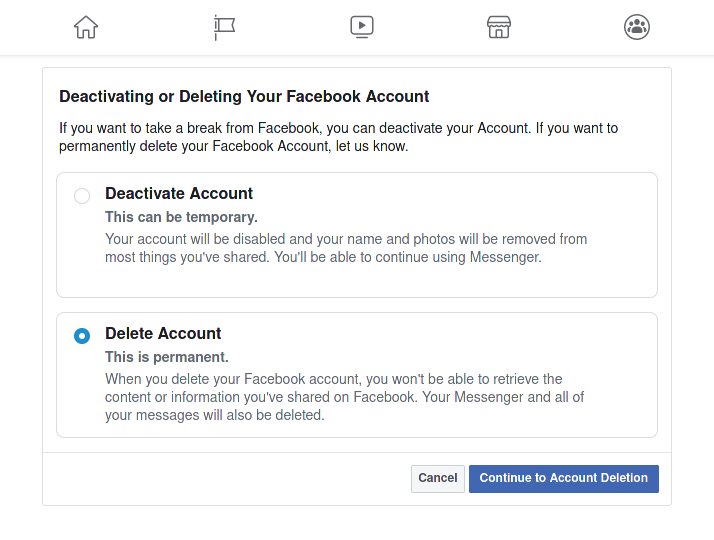
5. Select “Continue to Account Deletion.”
6 Select “Delete Account.”
7. Enter your password and click Continue.
It can take up to 90 days for Facebook to delete your personal data from the Internet. You will not be able to access any of the data once the deletion starts. However, you can cancel this within the first 30 days. Finally, you can also bulk delete messages from Facebook messenger.
Also read: What Is Web3 and How Will It Change Your Digital Life
How to Delete Your Twitter Account
Twitter has also followed in the footsteps of Facebook when it comes to harvesting your personal data. It utilizes this information for delivering personalized ads and tweets. You can download an archive of all of your personal data from Twitter. It makes it easy to monitor what information is available to the platform.
Click the “More” button from the left menu and head over to “Settings and privacy.” Follow the below steps to download your personal information.
1. Select “Download an archive of your data” from the “Your Account” section.
2. Select “Request archive” from under the Twitter data section. Enter your password when prompted.
3. It will take some time for Twitter to make the data available to you. You’ll receive an email once the data is ready to be downloaded.
It would be best if you also restrict data sharing and off-site activities. Head over to “Privacy and safety” and inspect the options under the “Data sharing and off-Twitter activity” section.
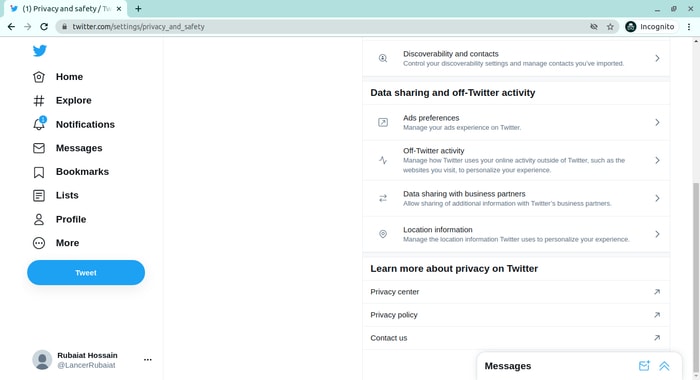
Look in the “Interests” and “Your advertiser list” sections from the “Ads preferences” tab. You can disable Twitter from tracking you in the “Off-Twitter activity” tab. Uncheck the options from the “Data sharing with business partners” and “Location information” tabs.
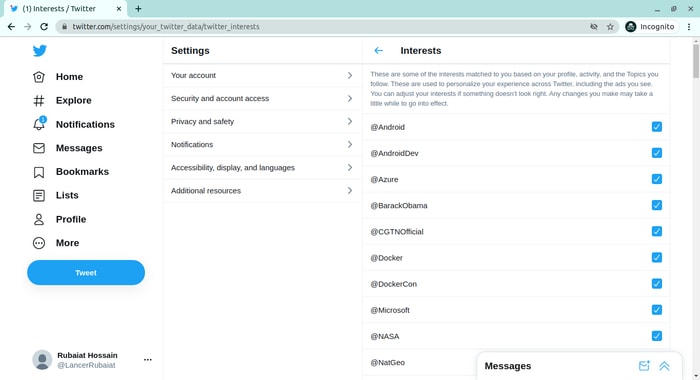
Finally, you need to deactivate your account for deleting all personal information from Twitter. You’ll have 30 days to reactivate the account. After that, Twitter will begin erasing your information from its systems. Note that they can still retain some information subjected to platform regulations. Moreover, you can also send disappearing tweets to protect your privacy.
How to Delete Your Instagram Account
Instagram has risen to prominence in the last couple of years. The company collects a huge amount of personal information from its users, including media, name, email, and much more. You’ll need to deactivate your account altogether if you want to delete everything Instagram knows about you.
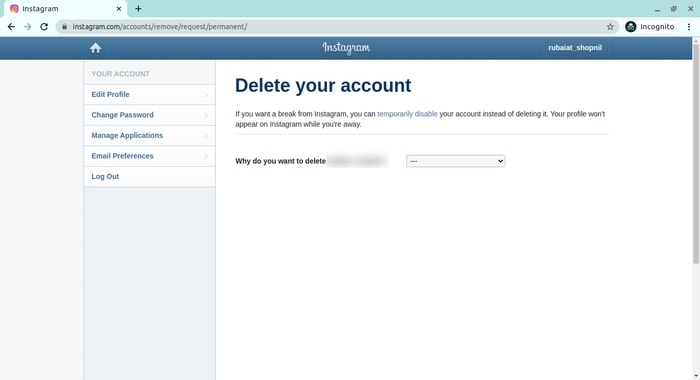
Head over to the Delete your account page and select the reason you want to delete it. Enter your Instagram password to verify your identity, then click on the Delete button. Instagram will hide your account details for the next 30 days and delete all personal data after the given period.
How to Delete Your TikTok Account
TikTok is another emerging platform that has become quite popular among millennials. Users share a lot of personal information through personalized music videos. You need to delete your TikTok account permanently to remove all personal data from TikTok.
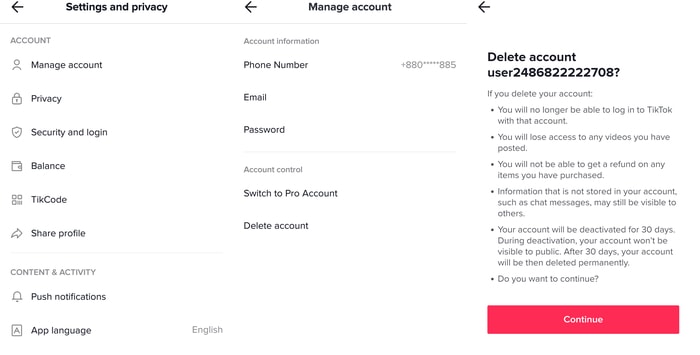
To do this, head over to “Me,” then tap on the … icon in the top-right corner of the window. Select “Delete account” from under the “Manage account” section. Follow the instructions provided there to continue deactivating your account. Like Instagram, TikTok also offers a 30-day time period to allow users to change their minds. It will delete your personal data from the Internet after this period.
How to Delete Your Snapchat Account
Snapchat is yet another popular social media network. If you are a Snapchat user, follow the instructions here to delete your Snapchat account.
Wrapping Up
Deleting your personal data from the Internet can be hard since it varies widely between services. However, most platforms give users full control over their data. You can remove personal data from almost all platforms. Just remember that people can still see some of your data from search engine caches. Plus, companies also tend to keep some basic information to meet business regulations.