


The internet is the greatest time-sucking enterprise ever invented. You spend hours upon hours online either doing work, spying on your friend’s social media pages, reading up on the latest news, or simply clicking on the link to whatever weird new site comes to your notice. Naturally, there are many parts of your internet search history that you may wish to remove from the record. Here’s how you can automate that process.
Also read: How to Disable or Automatically Delete Google Location History
Deleting Activity Data Automatically
Google Chrome offers you the choice to have your Internet activity records deleted automatically on a regular basis instead of waiting for you to remember to delete them manually. Follow these steps:
Head over to your Google account. If you don’t know where that is, simply go to your Gmail account and click on your profile photo in the top-right corner of the page.

Click on “Privacy and Personalization”, which might also show up as “Data and Personalization.” Beneath it is the “Manage your Data and Personalization” tab highlighted in blue.
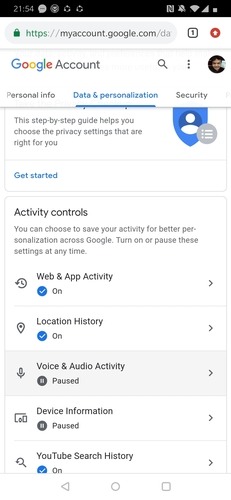
Select the tab and scroll down through the page that opens until you see the “Manage Your Activity Controls” section.
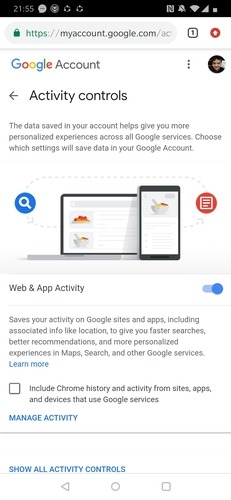
Click on the section, and you will see a page open which helps you manage the data collected by Google during your web surfing on Chrome.
The first section on this page should be labeled Web and App Activity. Choose the “How Long To Keep” tab located just beneath the section.
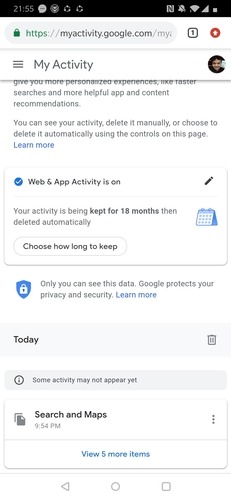
You will now be taken to a page which has the option “Choose To Delete Automatically.” Selecting this feature brings you to a pop-up box with three options.
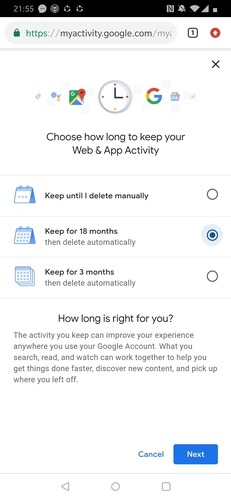
- Keep Until I Delete Manually: This keeps your Internet activity data on the Google servers until you choose to personally go in and delete that data.
- Keep For 18 Months: This option keeps your data on the servers for a period of a year and a half. The data from before that time will get deleted automatically at the end of 18 months.
- Keep For 3 Months: Exactly the same as the previous option, only this time your data is only kept on the servers for 3 months, after which it is wiped off the servers.
Click on the option that works best for you. Select Next. You will be shown a page explaining the double effects of choosing to automatically delete your data, where the data in the future will be deleted automatically after reaching the time limit, and the existing data that is older than the selected time limit will also be removed immediately.
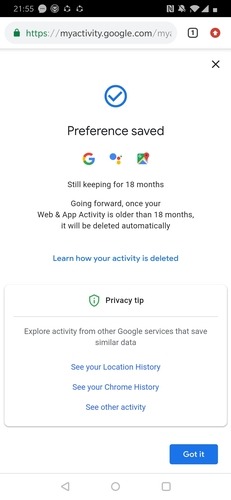
Hit Confirm and a page will show up stating that your new preference has been saved. All your data from beyond your selected time limit will now get automatically removed.
Remember that while tracking your web activity can be seen as an invasion of privacy, Google mainly uses the data it collects about your search history to give you a more personalized surfing experience, such as a more accurate autocorrect AI and Internet content mined directly from your interests based on your previous browsing history. Deleting all that data might negatively affect your future browsing experience on Google.
Conclusion
The “Automatically deleting your activity data” option is a good way to make sure your Internet history does not cause any problems for you down the road or become a privacy issue in case the information ever falls into the wrong hands online.