

Raspberry Pi is designed to run from the SD/MicroSD card. For operating systems like PIXEL, this means that your “root” and “Home” partitions all lie in the SD card, which can be a little limiting considering its minuscule storage size. If you are intending to run a home storage server on your Raspberry Pi, it is best to move the OS to the external hard drive so you have tons of storage space to use.
In this tutorial we will show you how to get Raspberry Pi 3 to boot up and run from the external hard disk.
Note: The reason Raspberry Pi 3 is used here is because it doesn’t need an additional power source to power up the external hard disk. The power supply of Raspberry Pi 3 is sufficient to power up the external hard disk via the USB port. Do make sure that you are using the official Pi power adapter or that your power plug is capable of outputting 2.5A (minimum) of current.
Before we start, here are the requirements for this tutorial:
- A Raspberry Pi 3
- A microSD card (minimum 4 GB) with PIXEL installed. (This tutorial assumes that you already have a working PIXEL installation on your microSD card. For more details, you can check out the tutorials here to set up images for Raspberry Pi.)
- An external hard disk formatted to Ext4. (You can use GParted or the fdisk command to format your external hard drive to Ext 4.)
Setting Up External Hard Disk
1. Insert the microSD card into the Raspberry Pi 3. Plug in the external hard drive to the USB port of the Raspberry Pi 3. Power up the Pi.
2. Once you have reached the desktop, open a terminal. Log into the root account and mount the external hard drive.
sudo su
mount /dev/sda /mnt
3. Next, we need to install Rsync (if it is not already installed):
apt-get install rsync
4. Copy all the files from the microSD card to the external hard drive. We are using rsync, so all file permissions and ownership are intact.
sudo rsync -axv / /mnt

5. With all the boot up files in the external hard drive, we need to modify the startup file so that it is pointing to the external hard disk for boot up instructions.
cp /boot/cmdline.txt /boot/cmdline.txt.bak
nano /boot/cmdline.txt
We need to edit two parts of this line. Change the root= to /dev/sda, and at the end, add rootdelay=5.
The result should look like this:
dwc_otg.lpm_enable=0 console=serial0,115200 console=tty1 root=/dev/sda1 rootfstype=ext4 elevator=deadline fsck.repair=yes rootwait rootdelay=5

6. Lastly, we are adding the hard drive entry to “/mnt/etc/fstab” so the root folder in the external hard drive is automatically mounted during boot up.
nano /mnt/etc/fstab
Add this line to the second line of the file:
/dev/sda1 / ext4 defaults,noatime 0 1
Add a “#” at the start of the last line to disable booting up from the microSD card:
#/dev/mmcblk0p7 / ext4 defaults,noatime 0 1
Note: /devmncblk0p7 is referring to your microSD card slot and the value might differ in your case.
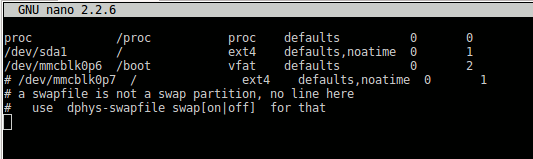
After the changes, it should look like this:
proc            /proc           proc    defaults          0       0
    /dev/sda1       /               ext4    defaults,noatime  0       1
    /dev/mmcblk0p6  /boot           vfat    defaults          0       2
    #/dev/mmcblk0p7  /               ext4    defaults,noatime  0       1
That’s it. Reboot your Pi, and it should boot up and run from the external hard drive. One thing to note is that the microSD card needs to be in its slot, as the Pi needs to read the startup file from it before it boots up from the external hard drive.
Optional: Increase the swapfile size
Assuming your external hard drive comes with tons of space, you might want to increase the swapfile size so your Pi can run slightly faster.
1. Open a terminal and log into the root account.
sudo su
2. Edit the swapfile.
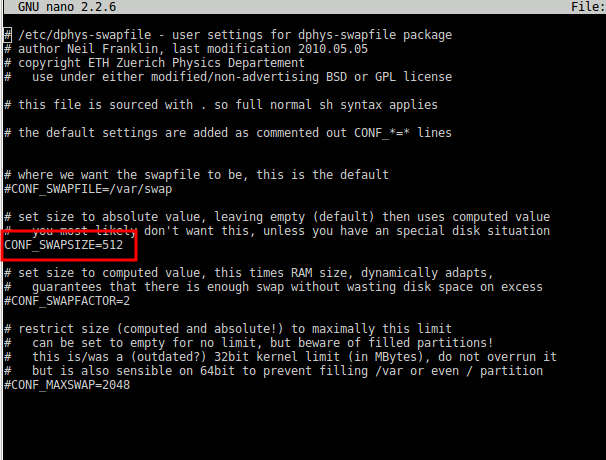
nano /etc/dphys-swapfile
Change the value of CONF_SWAPSIZE from 100 to 512. Save and exit the file.
3. Restart the service to update the changes.
sudo dphys-swapfile setup
sudo /etc/init.d/dphys-swapfile stop
sudo /etc/init.d/dphys-swapfile start
Conclusion
The Raspberry Pi 3 comes with several useful improvements such as higher RAM, a WiFi module and a power supply big enough to support an external hard drive. This makes it useful to run bigger and more intensive projects. As such, the microSD card with a small storage size can be a limiting factor, not to mention its slow read/write speed and it being susceptible to data corruption. With the instructions above, you can now power your Raspberry Pi from the external hard drive and improve its performance.