

On any list of lightweight Linux window managers, you’ll find Fluxbox. Originally a fork of Blackbox, Flux is well known as a fast, light, highly configurable desktop. Unfortunately, Fluxbox’s emphasis on text files for nearly all configuration often acts as a roadblock for those first trying it out. There is a GUI which provides some of the basic config options, but the bulk of it (menus, colors, keybindings) is found in text files. In this article, we’ll go over most of Fluxbox’s config files and how to tweak them to your needs.
Since we’re focusing on configuration, the remainder of the article will assume you’ve already got Fluxbox installed. All examples and screenshots were done using Fluxbox 1.1.1 on Ubuntu 9.10.
Fluxconf
Fluxconf is the basic configuration utility for Fluxbox. It doesn’t really have much beyond the most basic config options. It likely came with your Fluxbox package and so should already be installed, and can be launched with the command:
fluxconf
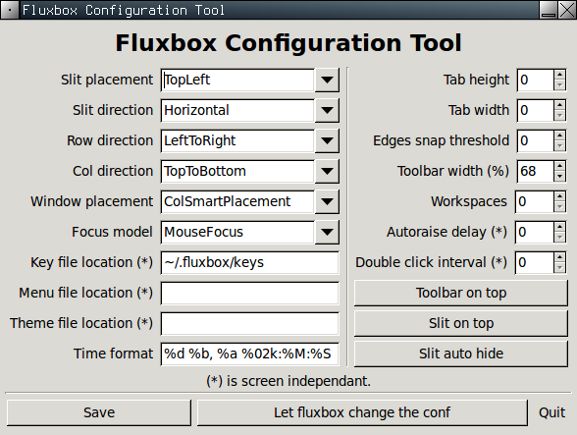
Main Configuration
Much of the configuration you’re likely to want to do can be done in the file ~/.fluxbox/init file. Open it with the text editor of your choice, and you can set a wide variety of common options. Some of the more notable entries include:
- session.menuFile: (location of the file containing the Fluxbox menu)
- session.screen0.toolbar.widthPercent: (1 to 100, width of toolbar across screen))
- session.screen0.toolbar.alpha: (0 to 255, transparency of toolbar. 255 is solid)
- session.screen0.toolbar.autoHide: (true/false)
- session.screen0.toolbar.tools: (items to include in the toolbar, more detail in next section)
- session.screen0.menu.alpha: (0 to 255, transparency of menu. 255 is solid)
- session.screen0.workspaces: (number of workspaces or “virtual desktops”)
Wallpaper
Setting a persistent wallpaper in Fluxbox can be surprisingly complex. There are various options to various programs that can all be used to set the wallpaper, either temporarily or permanently. For this reason, instead of going into all the complexities here, I’ll let the Fluxbox developers explain it in their own words.
Menu Editing
Fortunately, one of the more tedious aspects of configuration, menu editing, has a nice, functional GUI. The program fluxmenu, also bundled with your average Fluxbox package, does a good job of handling your menu needs.
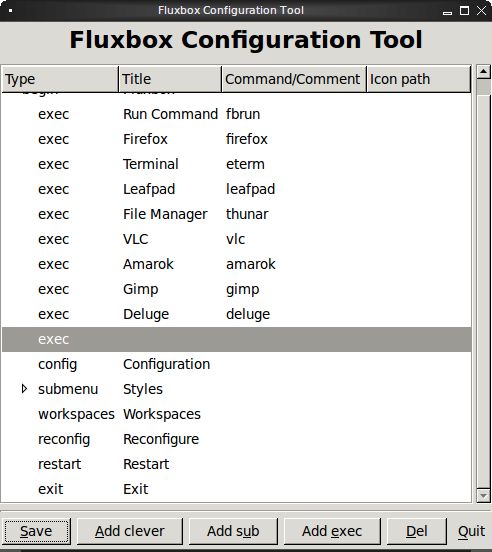
If, for whatever reason, fluxmenu doesn’t do the job, you can edit the file ~/.fluxbox/menu by hand. Also, make sure you update the ~/fluxbox/init file to point to your custom menu file as described in the Main Configuration section of this guide.
Mouse and Keyboard Bindings
You’ll find keyboard and mouse config in the file ~/.fluxbox/keys. If, like me, you’re used to scrolling the mouse in the opposite direction to move between workspaces, you’ll find that under OnDesktop Mouse4 and OnDesktop Mouse5 near the top of the config file.
Fluxbox names some of the keys in a way that might not be obvious at first. If you find yourself confused by Mod1 and Mod4, here are the keys to which they map:
- Mod1 = Alt
- Mod4 = Windows (aka Super) key
Transparency
You may have set some of the transparency options in the init file in a previous section. You may also have noticed that those transparencies may not have taken effect. Fluxbox, by default, does not have full compositing capabilities on its own, but you can get it through xcompmgr. They’ve created a guide located here with all the steps necessary to get xcompmgr and Fluxbox to play happily together. I’ve had mixed results getting this to work with various hardware and software combinations, so your mileage may vary.