

Let’s say you are running a news site and you need to aggregate news from various sources to your site. While you can add the news as posts (in WordPress) manually, a faster way is to automate the posting with a RSS feed. The question is how to get the feed incorporated into your site.
I came across this question recently, looking for a way to add a news feed to a site where I am the Chief Editor. We had contracted with a news service for an RSS feed, but adding the articles in one by one was getting very old very quickly. The answer is in the WP RSS Multi Importer plugin that allows you to add RSS feeds to WordPress automatically with limited setup.
Download/Install
After downloading the WP RSS Multi Importer plugin, you will then need to either add the plugin manually through FTP or through WordPress itself. Activate the plugin by going to the Plugins tab on your WordPress directory page.
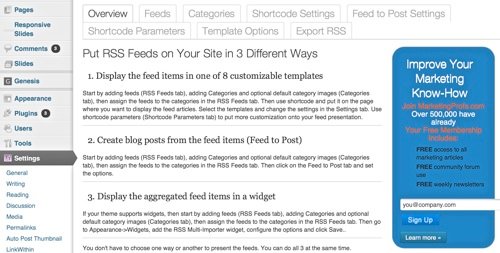
It can now be found in the “Settings” section of the WordPress directory. WP RSS Multi Importer offers you the ability to add the feed in three different ways. This tutorial is examining how to add the feed as regular blog posts, but there are also options to add the feed as a separate page and as a sidebar widget.
Set Up Feed
Click the “Feeds” tab and input the Feed Name and Feed URL for each feed you will be adding, then click “Save Settings”. Clicking on the “Categories” Tab will allow you to set a certain category for the feed to filter into.
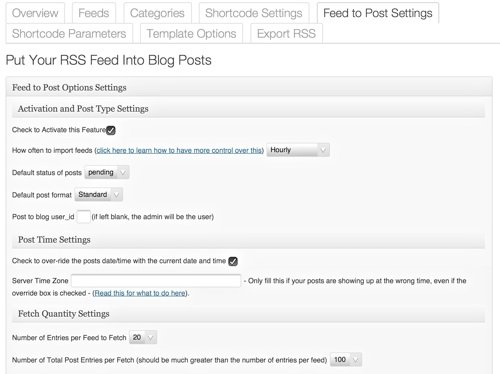
Click Feed to Post Settings and begin filling in the criteria for your feed:
- Activate the feed, choose how often the feed will update, the default post format, and the default post setting. You can also include a user ID as the author.
- Choose to have the feed update with the current date and time and optionally also input your time zone.
- Decide how many entries per feed you would like imported, as well as how many total posts you would like imported with each session. The maximum for the first value is 20, so if you only have one feed, the second number is irrevelant, as you will only be able to add in twenty posts from that one feed.
- Choose the target window, whether it’s Lightbox, or whether a link will open in the same or a new window.
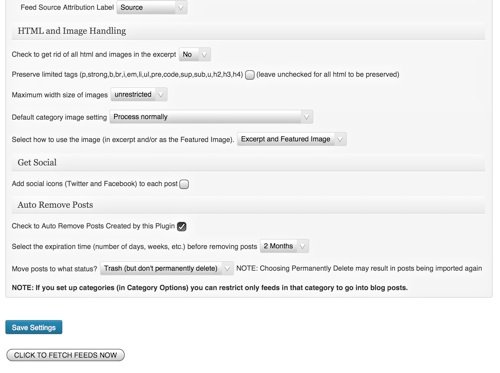
- Select the length of the excerpt that will show from 20 words through the whole article.
- Decide whether or not you want the feed’s author name and source to show, as well as the attribute label – Source, Via, or Read More Here.
- Choose whether or not images will be imported, the size, the category, and whether it will show in the excerpt, the Featured Image or both. You can also choose to preserve your HTML tags when they’re imported.
- Click to add Facebook and Twitter options to the posts and when and if the feed posts should be removed from your site.
- Save your criteria by clicking “Save Settings.” If you’d like to immediately import the feed, Click to Fetch Feeds Now.
Tips
Some of your success will depend on the options of your feed itself. I have played with the WP RSS Multi Importer plugin to determine things that work and don’t work. I had a problem with not all of my posts showing up, despite the number of posts I told the plugin to add in every day. After those posts were already skipped, it’s impossible to add them in with the feed. It has already recognized the posts by date, and once it runs a post from a certain time on a given date, it won’t recognize any posts from before that time the following day, and they don’t seem to get added in order.
I have control over the content in the feed I’m adding in, and there are Rankings within the feed. If I set the posts I wanted added in with lower numbers than the posts that had earlier been added in, the plugin will import these posts and won’t skip over them indiscriminately. Because of this, I make sure I update the feed on WordPress manually every day so that I can have a chance to go into the feed and change the ratings before it gets added in.
Conclusion
After I worked out the bugs in the plugin, I have found that using it to add feeds to WordPress saves me a lot of time every day. If you use or have used a plugin to add feeds to WordPress, comment below and let us know of additional tips you have found.