


It’s not uncommon for users to have more than one Gmail account. You can have one email account for personal reasons and another for business. For business email addresses, you may want to make it easy for your customers to gain access to your site. Some people do it with an image hyperlink in their signature.
Gmail makes it possible to add any link to any image on your email. The following guide will show you how.
Also read: How to Personalize the New Gmail App
How to Add a Link to an Image in Gmail
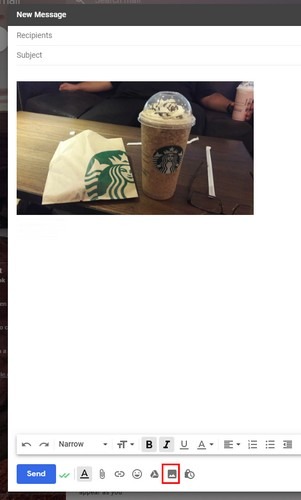
To add a hyperlink to an image, you’ll need to sign in to your Gmail account. Click on the image icon at the bottom to choose the image you want to add, and click on the blue “Insert” button.
The image will appear in the area where the cursor is at that moment. If you want the image to be at the bottom, you’ll need to place the cursor down there.
How to Resize the Image
If you’re not happy with the size of the image, click on it and resize it by clicking on one of the corners. You can make it as big or small as you’d like by dragging it until it is a perfect size. To add the hyperlink to your image, click as many times as necessary to the right of the image until it turns blue. When the image is highlighted in blue, click on the link icon at the bottom.
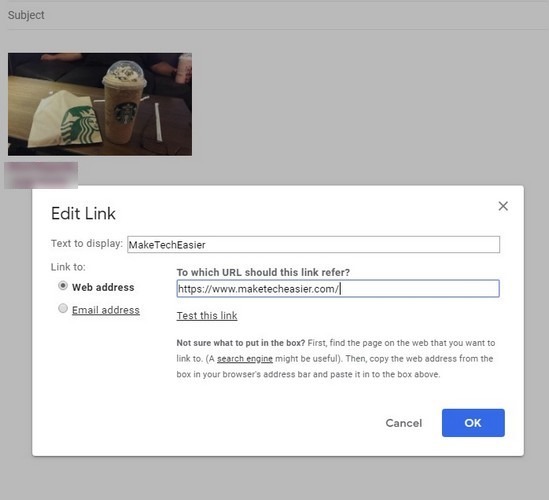
When you click OK, the text you wanted the link to show will be right under the image. If you ever want to remove it or make any changes to it, click on the image to see the options for that. You can also see the address you added in case you forget to double-check the URL you added.
To test that the link works, click on the “Test this link” option right below where you entered the URL. A new window will appear with the URL’s website. If everything looks and works okay, you can click on the blue OK button at the bottom-right.
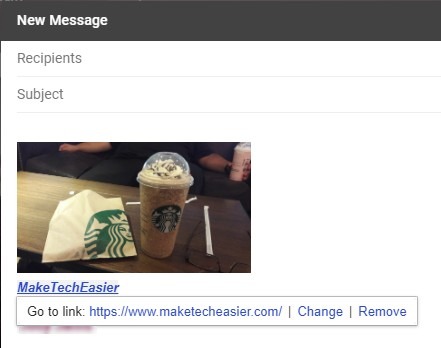
If you click on the “Remove” option, the link will be removed, but the text that you added will remain below the image. To remove it, just erase. By clicking on the URL when you click on the image, the site you added will be opened in a new tab and not in a new window.
Conclusion
These straightforward steps are all you need to do to add a link to your images in Gmail. If you ever want to make any changes, this is also easy to do. It will not be easier to guide others to your site. Let us know if you try adding a linked image in your Gmail.